Corrupt Text Tool

Corrupt Text Generator

Use our corrupt text generator to glitch, curse, or completely ruin your text.Read more

How to master the corrupt text generator

01

Type or paste plain text

Enter the exact corrupt words or message you plan to use. The generator keeps spaces and punctuation in place and adds marks only to eligible letters and numbers, so the source wording remains identifiable beneath the effect.

02

Choose the corruption mood

Mild, Glitch, Heavy, and Cursed load tested defaults of 24%, 52%, 72%, and 92%. Balanced, Rising, Dripping, and Chaotic then change where the marks accumulate instead of replacing the source letters.

03

Preview and rebalance the effect

Read the character, UTF-8 byte, and paste-risk indicators before copying. Generate creates another seeded arrangement with the same selected settings; lower the intensity if the words stop being recognizable.

04

Copy the version you want

Copy the result only after paste-testing it in the destination. Clean mode can strip the mark ranges this corrupt text generator creates, while Reset restores the original demo and control defaults.

How the corruption actually works

A corrupt text generator does not install a font or render an image. It appends Unicode combining marks above, through, and below eligible letters and numbers while leaving spaces and punctuation in their original positions.

The base characters remain in the string, which is why output can still copy as text and why this tool can clean its own generated marks. The extra marks also increase storage length: a short line can carry far more code units and UTF-8 bytes than its visible source.

When to use cursed text styles

Use corrupted text as a display effect for a short horror title, ARG clue, haunted username, Halloween caption, fictional warning, or game message. Mild and Glitch suit phrases that still need quick reading; Heavy and Cursed are better for a few dramatic words.

Do not use it for passwords, recovery details, instructions, search terms, or long body copy. Those contexts depend on exact reading and predictable character limits.

Use creepy text without making it unreadable

In the local test, “Signal restored 404” began at 19 characters and 19 bytes. Balanced Mild produced 47 characters/75 bytes, Glitch 130/241, Heavy 294/569, and Cursed 728/1,437; every version still normalized to the same source.

Those figures show why intensity matters more than the label alone. Start low, check the destination field, and increase one step at a time rather than assuming a corrupted message that fits here will fit a username or chat limit elsewhere.

Corrupt, glitch, and zalgo text explained

Corrupt text is the broad damaged-text effect on this page. Glitch is the medium preset with broken digital marks; Heavy builds denser stacks; Cursed is the strongest Zalgo-like option. These labels describe mark density, not separate downloadable fonts.

For a narrower classic glitch workflow, use the existing glitch text generator. Keep this page when you need four intensity presets, directional mark placement, measured byte growth, or Clean mode.

Error Text Generator

For an error-style line, try a short corrupt message such as “Error 404,” “signal lost,” “access denied,” or “system failure.” Mild or Glitch usually preserves the warning; Heavy and Cursed emphasize spectacle at the cost of legibility and byte size.

This is decorative copy-paste output. It does not inspect code, diagnose a device, create a real system alert, or guarantee that another app will retain every combining mark.

Tested on the live tool

A controlled corruption test

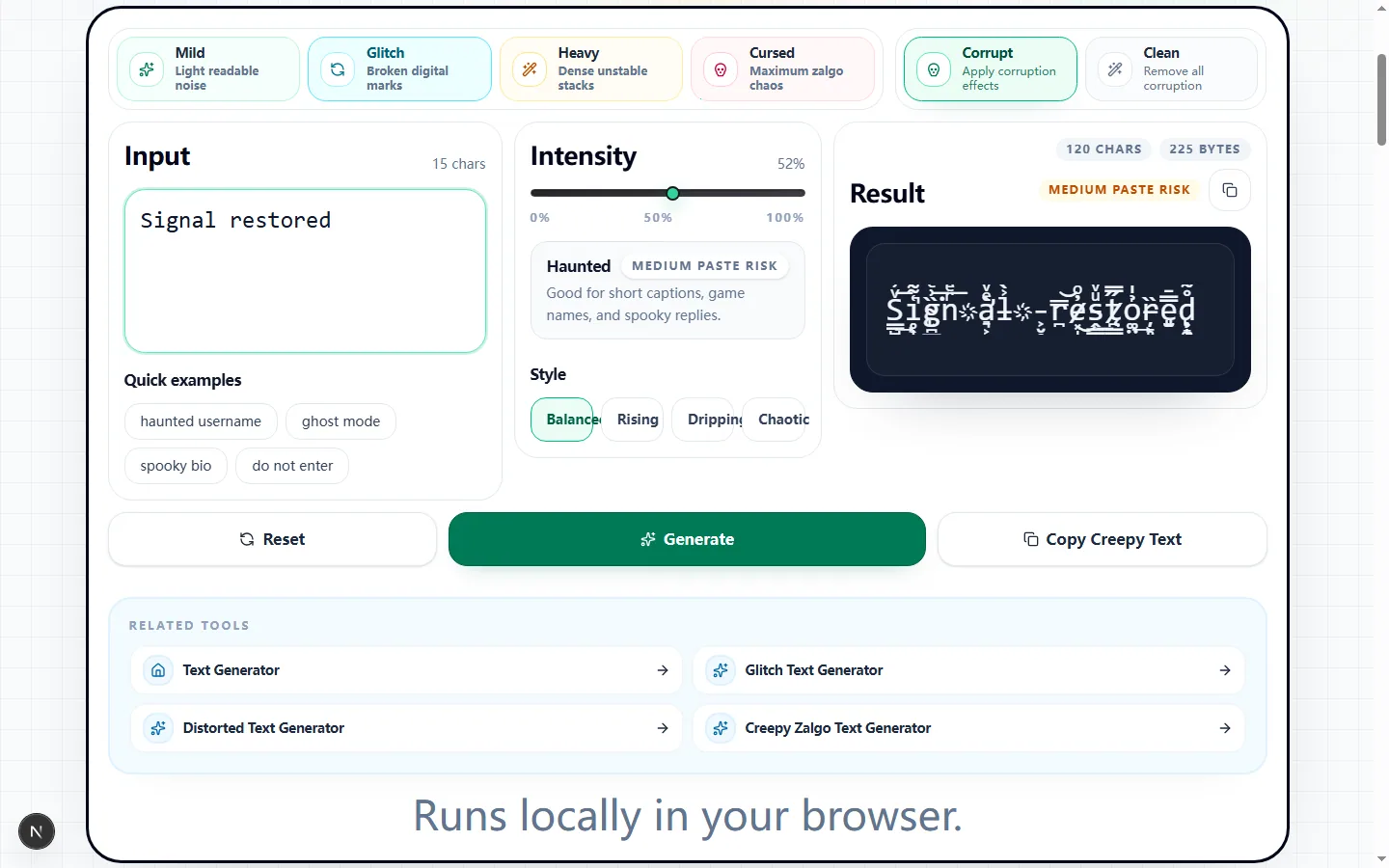
This capture uses a short phrase so the added combining marks, intensity choice, and readable base letters can be checked at a glance.

Test input
Signal restored
What was checked
Glitch preset with a restrained intensity
Corrupt Text Generator showing the tested phrase Signal restored and its generated glitch text output
The base phrase remains identifiable while the generated marks extend above and below the letter line.Real tool capture; surrounding artwork is decorative.

A repeatable corrupt-text workflow

Paste the final phrase, choose Mild or Glitch, keep Balanced, and note the starting character and byte totals. Raise intensity only while the source remains readable, then try Generate for a different mark arrangement without changing the words or settings.

If the preview looks too dense, reduce the intensity slider before changing the directional style. Keep the plain source text handy so you can easily reset and start the loop over if the marks become too chaotic.

What the presets and directional styles change

Mild, Glitch, Heavy, and Cursed increase activation and mark-count ranges at default intensities 24, 52, 72, and 92. Balanced distributes all three mark groups evenly.

Rising weights above-letter marks, Dripping favors below-letter marks, and Chaotic boosts the through-letter group while slightly increasing the others. At Glitch 52 in the test, the four styles ranged from 127 to 143 displayed characters, proving direction can change the total for a seeded pattern.

Where corrupted Unicode is genuinely useful

A text corruptor is useful when the visual distortion itself carries the message—implying instability, interference, or chaos. Short phrases let readers recognize the corrupt words before the marks dominate them.

Use ordinary text for essential information. Corruption is decoration, not encryption, translation, or a substitute for a readable message.

Clean mode is cleanup, not a universal decoder

Clean mode removes the combining-mark ranges generated here. In the test, it restored the 728-character Cursed sample to the exact 19-character source “Signal restored 404.”

Clean mode provides a best-effort recovery for third-party text. It cannot reverse deleted letters, arbitrary symbol substitutions, another site's custom alphabet, or an unknown corrupted language, so compare the result with the intended wording.

Compatibility and accessibility limits

Combining marks are valid Unicode, but fonts and fields allocate different vertical space. Dense output may clip above or below the line, wrap early, exceed byte-based limits, or be stripped by filters.

Screen readers may announce marks or pause unpredictably. Keep a plain-text equivalent and never use corrupted text for labels, links, instructions, or content that must be understood with assistive technology.

How to check the result before you keep it

Check the exact destination on both a narrow mobile screen and a desktop monitor. Confirm the full line pastes, no vertical stack is cut off by the app's line-height, byte limits accept it, and the underlying message remains recognizable.

If the destination app strips the marks entirely, you have hit a platform filter and cannot force the effect.

Corrupt text generator FAQ

Short answers to the compatibility and cleanup questions people usually ask before they paste corrupted text into another app.

Can I use creepy text for Roblox, Discord, or Reddit?

+
Usually, but test the pasted result first. Roblox, Discord, Reddit, and similar platforms can handle some Unicode marks, but dense creepy or cursed text may be clipped, filtered, or displayed differently depending on the field.

Is this a scary font generator copy and paste tool?

+
It creates scary-looking Unicode text rather than downloadable font files. You can copy the generated creepy, cursed, or zalgo-style text directly, but it does not install fonts or export a font file.

Can clean mode recover readable text?

+
Clean mode strips the combining marks produced by this tool and can recover its source letters. Cleanup of third-party corrupted text is best effort because symbol substitutions or deleted letters cannot be reconstructed.

Is heavy creepy text good for screen readers?

+
Heavy Unicode corruption is mostly visual and can be noisy or confusing in assistive technology. If readability or accessibility matters, use Mild or Clean mode and keep the final text simple.

Why does the same preset look different when I regenerate?

+
Generate advances the seed, so it changes the combining-mark pattern while keeping the source, preset, intensity, and directional style intact.