Roblox Booth Sign Tool

Please Donate Text Generator

Use this Please Donate text generator to draft short booth text, compare font andRead more

How to craft a booth sign that actually gets noticed

The best text for a PLS DONATE booth states one goal or activity before adding decoration. A readable line such as “Goal: 50 Robux” tells a passing player what the booth is for; a vague request, repeated emoji, or several promises compete for the same limited space.

Use the booth preview to compare the wording against a stand, but treat it as a planning view. The game controls the final font support, filtering, wrapping, and display, so no browser preview can promise exactly how a sign will appear in a live server.

Mastering the font and color controls

The editor lists 52 font names, sizes text from 28 to 96 pixels, sets HTML weight from 400 to 900, adds optional italic styling, and applies a 0-to-12-pixel stroke. These values are written into the generated markup; they are not proof that every value is supported in-game.

Solid uses the selected text color. Rainbow and the four split-color modes override it by wrapping each non-space character in its own color tag. The Generated HTML box is read-only, so use the controls to revise it here rather than assuming an arbitrary font name can be entered on this page.

Why styling your text is so important

Color and outline should make PLS DONATE sign text easier to scan, not hide the request. Check the smallest letters across the Meadow, Sunset, Fair, and Grove preview backdrops, and reduce the stroke when it fills the counters of letters or makes adjacent characters merge.

Preview Zoom runs from 85% to 125% for inspection only. It does not change the HTML font-size value, and a larger browser preview does not guarantee a larger in-game sign.

Quick tips for writing booth text

Use one specific message: name the goal, activity, or reason, keep important words in plain text, and add an emoji only when it supports the meaning. The six quick templates are editable starting points, not evidence that one line is the best PLS DONATE booth text for every server.

Do not enter passwords, account details, private contact information, or claims you cannot honor. TextKits is an independent, unofficial tool and is not affiliated with or endorsed by Roblox or PLS DONATE. Roblox and PLS DONATE names and trademarks belong to their respective owners.

Tested on the live tool

A booth-sign readability test

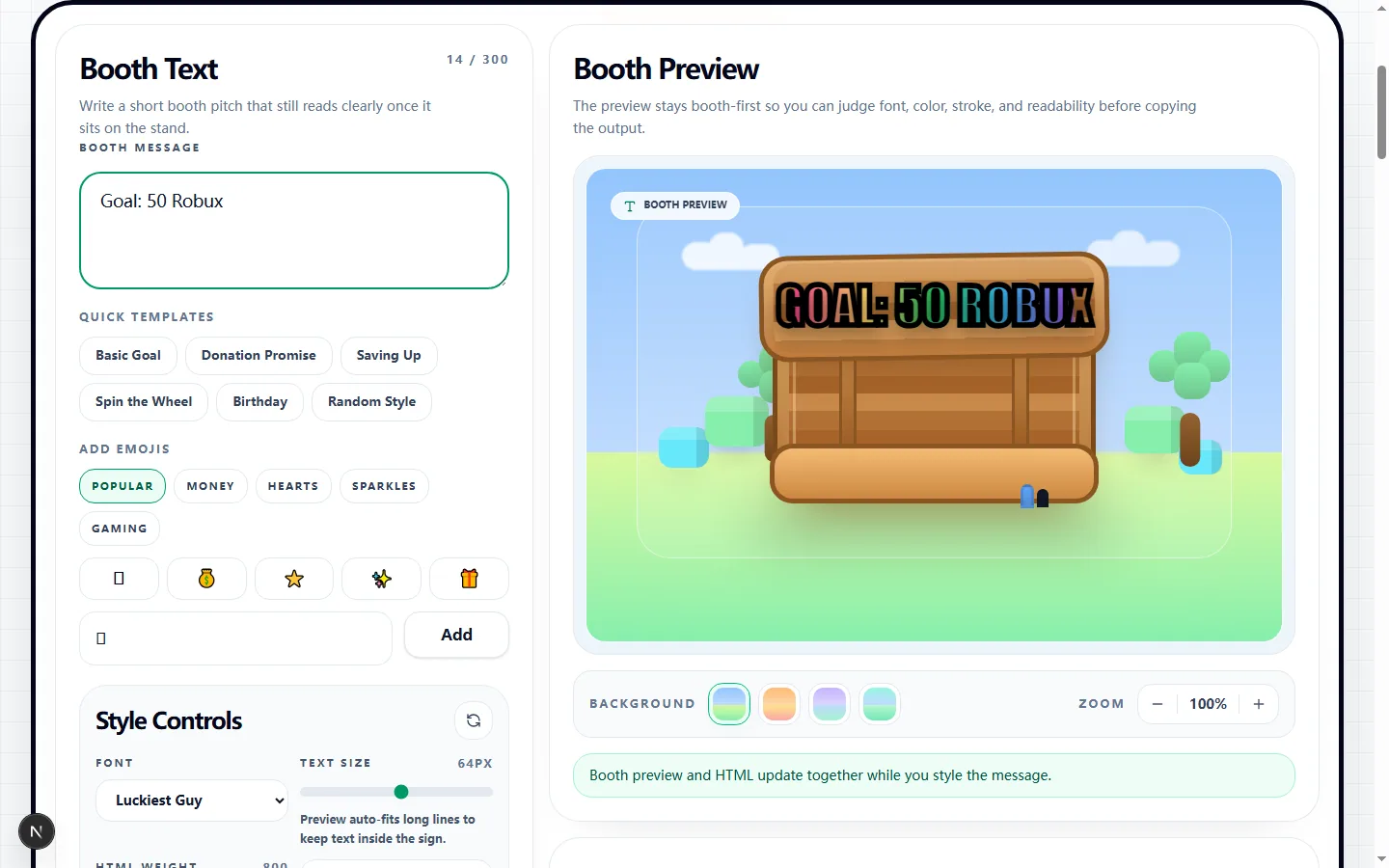
This real preview uses a concrete goal message, making it easier to judge the hierarchy between the request, amount, color, and outline.

Test input
Goal: 50 Robux
What was checked
Short goal message with readable booth styling
Please Donate Text Generator showing a tested Goal 50 Robux booth preview
The compact wording leaves room for the visual treatment without turning the amount or donation goal into background decoration.Real tool capture; surrounding artwork is decorative.

Build the booth message before styling it

Start with the PLS DONATE booth text itself. The editor keeps up to 300 characters, but shorter sign text is easier to inspect and test. Templates include goal, donation-promise, wheel, birthday, and randomized-style starting points; replace their wording with your own accurate message.

The message, preview, and generated HTML update together. Keep the request understandable without color or emoji because the destination may filter a character, use a fallback font, or render the rich-text-style code differently.

Tune the controls that appear in the generated HTML

Choose one of 52 listed font names, set text size from 28 to 96 pixels, HTML weight from 400 to 900, optional italic, and stroke from 0 to 12 pixels. Stroke has its own hex color. Solid mode adds the selected text color to the outer style.

Gradient modes create PLS DONATE color text code by cycling individual color tags over non-space characters. In the measured “Goal: 50 Robux” test, Blue-Purple produced 12 color tags, used BuilderSansMedium at 72px and weight 700, and included an italic 3px #111827 stroke.

Judge the sign in the booth preview, not the picker alone

Compare the same PLS DONATE custom text against Meadow, Sunset, Fair, and Grove. Zoom can move from 85% to 125% in 5% steps, but it changes only the inspection view; it does not appear in the copied HTML.

The tested 14-character goal produced 503 characters of generated markup because gradient output wraps letters individually. Check the actual words, outline, line breaks, and contrast rather than treating a longer code block as a better sign.

Understand the Roblox and PLS DONATE limits

This Please Donate text generator prepares rich-text-style markup in the browser. It does not connect to a Roblox account, publish a booth, bypass chat or content filtering, or verify which tags and font names the current PLS DONATE renderer accepts.

Paste the code only where the game currently permits booth rich text, then inspect the live result. If the destination rejects or changes a style, return to a simpler listed font, Solid color, lighter stroke, or plain wording. The independent-brand disclosure above applies throughout this workflow.

What is saved and what stays private

Save Message writes the current message text to local storage in this browser and restores it on the same device. It is not cloud sync, a Roblox save, or a published booth, and it does not guarantee that another browser will recover the draft.

Generated HTML is built locally and copied through browser clipboard permission. Remove private information before saving or copying, and clear the site's stored data on a shared device. Changing or clearing the on-screen editor does not by itself prove every previously stored browser value has been removed.

Test the copied sign in a repeatable way

Copy HTML, paste it into the permitted PLS DONATE booth field, and inspect the live sign. Compare font fallback, fill colors, stroke, emoji, filtering, and wrapping with the browser plan instead of assuming a successful paste accepted every declaration.

If the result differs, change one variable at a time and paste again. Record the font and color mode that worked, then read the final booth text quickly on the device you normally use. This produces more reliable booth text ideas than adding more effects at once.

Please donate text generator FAQ

Use these answers to separate browser preview behavior from what must still be checked in PLS DONATE.

How do I put this text onto my actual PLS DONATE booth?

+
Use Copy HTML, open the booth editor in PLS DONATE, and paste only where the game currently permits rich text. Review the live result before keeping it because filtering and formatting support can change.

Why did my sign look slightly different when I opened the game?

+
The browser preview approximates the selected font, color, stroke, and backdrop. PLS DONATE controls the final renderer and may fall back, filter markup, wrap differently, or ignore a declaration.

Where are all the other cool Roblox fonts?

+
The selector contains 52 listed font names. The Generated HTML box is read-only, and listing a name does not guarantee current in-game support. Test a listed option in the destination instead of assuming an unlisted name will work.

Will this tool remember my awesome sign design for tomorrow?

+
Save Message stores the current message text in this browser's local storage and can restore it on the same device. It is not cloud sync or a Roblox booth save; remove the site's browser data after use on a shared device.

I have no idea what to write on my booth... help?

+
Start with a quick template, then replace it with one accurate goal, activity, or reason. Keep the important request in ordinary words and verify the final PLS DONATE booth text in-game.