Original pixel box
The deltarune text generator renders an original TextKits dialogue box instead of bundling official sprites, fonts, or character art.
Original pixel textbox preview with PNG and GIF export
Enter a short line, choose a preset, turn smart asterisk formatting on or off, and watch the original TextKits box update in the browser.
Visual workflow
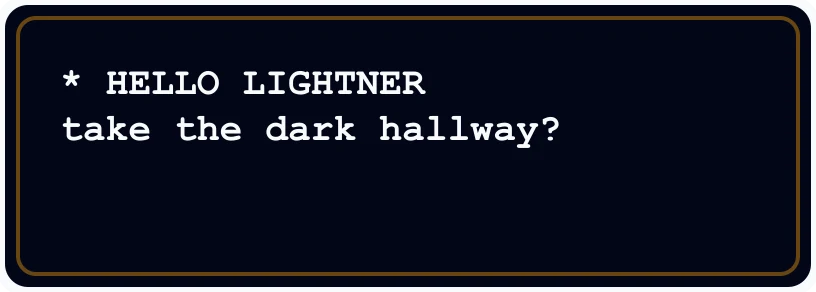
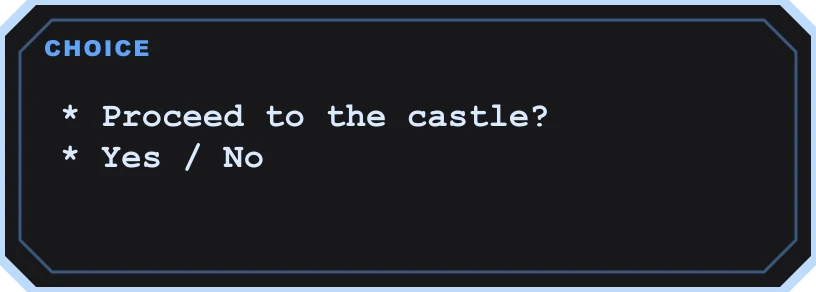
The deltarune text generator renders an original TextKits dialogue box instead of bundling official sprites, fonts, or character art.
Long lines, crowded boxes, and weak contrast are flagged before you download PNG or GIF output.
Copy a text fallback, copy deterministic alt text, or download the current pixel textbox as a PNG image or animated GIF.
Start with one to three short lines. The deltarune text generator is easiest to read when the message stays compact.
Choose dialogue, dark, narrator, or choice styling. Each preset changes the frame, color treatment, and preview behavior.
Review line length, wrapping, speaker label, and contrast notes before saving the image.
Copy the formatted text fallback, copy the alt-text helper, or download a PNG or animated GIF of the current preview.
Original assets
The deltarune text generator is designed for fan captions, profile graphics, tabletop notes, meme drafts, and quick dialogue mockups. It does not bundle official game art, official fonts, or character sprites. The goal is a fast Deltarune-inspired text box that stays honest about what it can export.
This deltarune text generator creates an original pixel dialogue box from your text. The first result is a live preview, so you can see line breaks, speaker text, and visual contrast before downloading anything. Presets adjust the frame, colors, and dialogue treatment, while the same state drives the PNG and GIF exports.
Use the deltarune text generator for short lines such as HELLO, a speaker quote, a mock menu choice, or a compact social post graphic. Long paragraphs can still be tested, but the tool warns when the text may feel cramped, wrap awkwardly, or become hard to read inside the box.
The deltarune text generator includes a small preset set rather than a giant control wall. A simple dialogue preset gives a readable black box. A darker preset gives stronger contrast. A narrator preset works for short descriptions. A choice-style preset helps when the line is closer to a menu prompt than a speech line.
Smart formatting is optional. When it is enabled, the deltarune text generator can add the leading asterisk and keep wrapped lines aligned in a dialogue-like way. When it is disabled, your text stays closer to what you typed.
Fit warnings are part of the output, not an afterthought. The deltarune text generator checks long lines, too many wrapped lines, and low-contrast combinations. These warnings help you fix the image before you post it.
The deltarune text generator supports practical, limited outputs: a live browser preview, copyable fallback text, deterministic alt text, PNG download, and animated GIF download. The PNG is the stable visual output, while the GIF exports a lightweight typing-style animation from the same original textbox state.
The export panel also says what is not included. This deltarune text generator does not create sound, video, permalink pages, HTML embeds, official sprites, or official font files. Those limits keep the page focused on useful browser outputs: a clean Deltarune-inspired textbox image and a simple animated GIF.
The alt-text helper is useful when you share a generated box as an image. The deltarune text generator builds a plain description from the speaker label and dialogue, so you can copy a concise accessibility note without writing it from scratch.
Many users search for a Deltarune text font when they want a familiar dialogue feel. This page handles that expectation carefully. The deltarune text generator uses original TextKits styling and browser-safe rendering choices. It is not an official Deltarune text font download, and it does not extract game files.
If you want an exact official font or official character artwork, this deltarune text generator is not that kind of page. If you want a quick original textbox that feels close enough for a draft, caption, prop, or social graphic, the tool is built for that job.
The deltarune text generator is strongest for short, readable messages: a fake dialogue line, a stream overlay note, a roleplay prop, a party invite, a tabletop clue, or a small joke image. It is also useful when you need a Deltarune text box PNG or a simple animated textbox GIF for a design draft and want the frame, text, and contrast checked together.
The deltarune text generator is not meant to replace a full comic builder. It does not create long multi-box conversations or imitate official characters. Keep the message compact and original, then use the PNG or GIF in a place where ordinary image files are accepted.
Sometimes you are not trying to build a whole comic. You just want a quick Deltarune dialogue generator where you can type one line, see the box, and decide if it feels right. That is the everyday use case here: write the line, pick the speaker, and let the preview show whether the dialogue is too long or too cramped.
If you searched for a Deltarune dialogue maker, this is meant to be the low-friction version. You do not need to set up a big editor before you can test a joke, a scene idea, or a short roleplay quote. It also covers the dialogue maker Deltarune wording people use when they mainly want the box style, not a complicated asset pack.
A lot of searches are really about that simple proceed moment: a short prompt, a boxed line, and a choice-like feel. If you are looking for a Deltarune proceed text box, start with a compact prompt and use the choice mode when the line needs options instead of normal speech.
The same workflow also fits proceed Deltarune text box and proceed text box Deltarune searches. In plain terms, use it when you want something that reads like a small decision screen: one prompt, a few choices, and enough spacing that the final PNG still looks clean.
If your goal is a finished image, treat the tool like a Deltarune dialogue box generator first and an export tool second. Type the line, check the preview, adjust the box colors if needed, and only then save the Deltarune dialogue box PNG. That keeps you from downloading a box that looks fine at first glance but clips or wraps badly.
Some people search for a Deltarune dialogue font generator because they want the familiar dialogue feeling. This page handles that as a visual textbox workflow instead of an official font download: the text is rendered inside an original pixel-style box, and the PNG or GIF export is what you share.
Short answers about original textbox styling, font limits, PNG/GIF export, presets, mobile use, and why this tool avoids official asset claims.
Progressive enhancement flow
Text style
Applied: love - wave - 38
Portrait
Text defaults
Line box
CurrentBorder style
Asterisk
Preview

Preview
Global
Export
Text fallback
* i love you
Alt text
Original pixel-style dialogue box. Kris says: * i love you
Ready
Runs locally in your browser.