Blackout Sensitive Text Fast

Redacted Text Generator

Use this redacted text generator to turn a whole draft or selected emails, phone numbers, URLs, numbers, and custom terms into copyable blackout characters.Read more

How does redaction actually work in your browser?

This redacted text generator replaces characters in the text itself with a Unicode full block or a colored square token. It does not place a graphic over the original words, so the result can be selected, copied, and pasted as text.

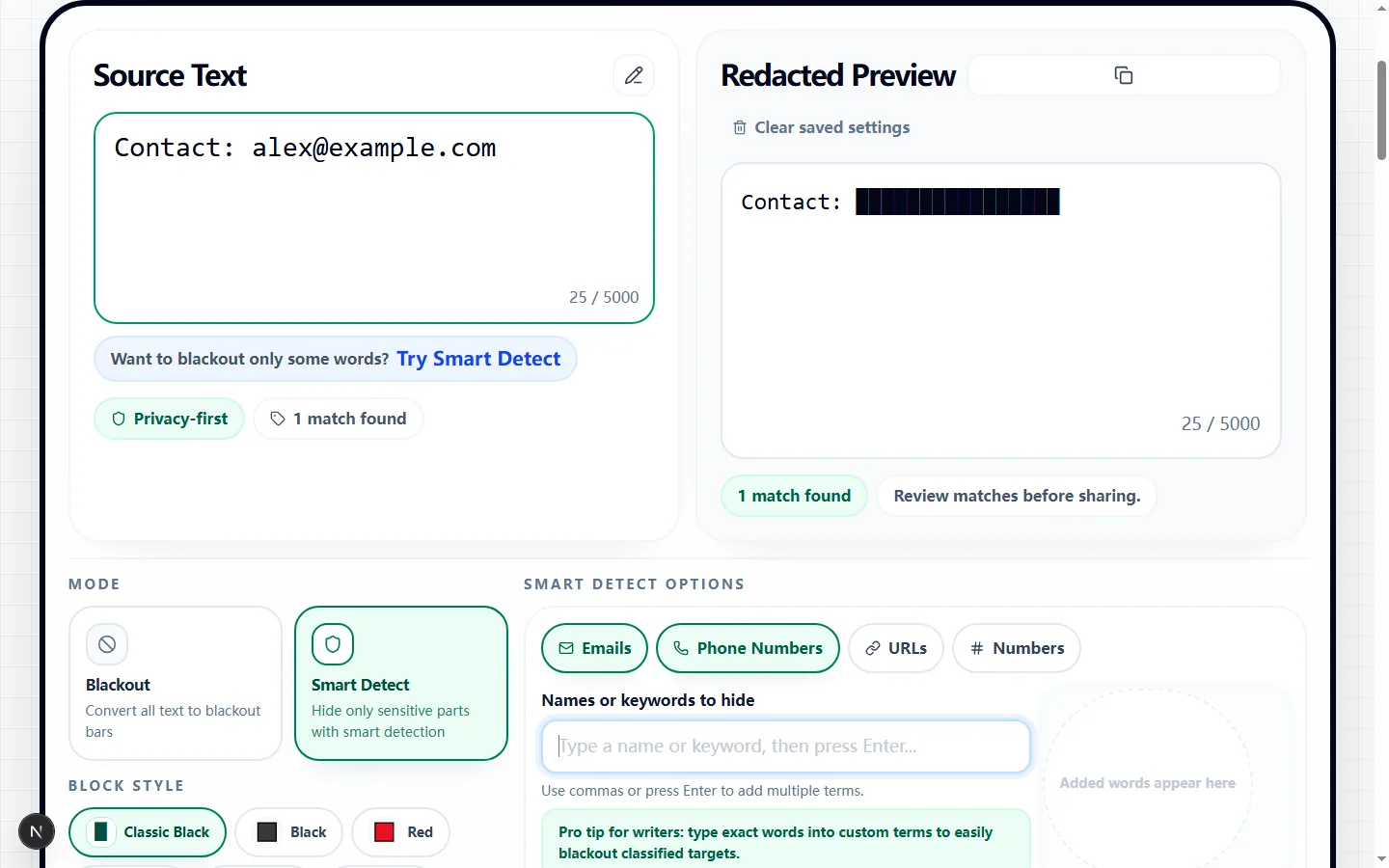
In a browser test, Contact: [email protected] became Contact: ████████████████, and the clipboard value exactly matched the preview. That confirms the copy action, but it does not prove that every sensitive value was detected; review the result before using it.

Full Blackout vs. Smart Detection

Blackout mode masks every letter and digit across the draft while preserving whitespace, line breaks, and punctuation. In the tested input Alpha 42! followed by Beta? on a new line, the redacted text generator returned █████ ██! and ████?, preserving the two-line structure.

Smart Detect leaves ordinary text visible. Email and Phone Number detection start enabled, while URL and Number detection are optional. Turning on Number can also hide dates, quantities, prices, or ticket IDs, and a URL match can include punctuation immediately before the next space, so check the preview rather than assuming the boundaries are correct.

Perfect for SCP Foundation & Discord Roleplay

For SCP-style reports, classified notes, Discord roleplay, or wiki drafts, the redacted text generator can create copy-and-paste black bars without requiring an image. Blackout works for a fully obscured line; Smart Detect and custom terms preserve the surrounding story.

These blocks are decorative Unicode text, not proof that a private source is safe to publish. Discord, documents, email clients, and wiki fonts may render a full block or colored square at different widths, so paste a draft into its destination and inspect it before posting.

When is the best time to use this?

Use the redacted text generator when a support example, test log, note, or public demo needs readable context around selected details. A customer email, phone number, URL, ticket number, project name, or known phrase can be checked in the preview before you copy the blacked-out text.

For passwords, access tokens, financial records, health data, or regulated information, automatic pattern matching is not a sufficient release process. Use your organization's approved redaction workflow, verify the source independently, and treat this browser tool only as a drafting aid.

Tested on the live tool

A redaction coverage check

The sample includes an ordinary label and an email address so the hidden part can be checked without losing all of the surrounding context.

Test input
Contact: [email protected]
What was checked
Smart detection followed by a visual review
Redacted Text Generator showing a tested contact line with the email address obscured
The tested output obscures the sensitive address while keeping the non-sensitive label available to explain what was removed.Real tool capture; surrounding artwork is decorative.

Choose between a complete blackout and selective redaction

Paste up to 5,000 characters and decide what the recipient still needs to read. Blackout mode is suited to a fully obscured sample because it replaces letters and digits throughout the draft while retaining spaces, punctuation, and line breaks that show its structure.

Smart Detect keeps the surrounding sentence readable and masks only enabled detector matches plus custom terms. That makes the redacted text generator useful for a support-ticket example in which the problem description can remain while contact details are replaced with copyable blocks.

Configure the detectors for the text in front of you

Email and Phone Number are enabled when Smart Detect opens; URL and Number are separate switches. In one mixed test, the defaults created two merged redactions, while enabling all four detectors created four. The broad Number option also caught the digits inside the phone and URL before overlapping matches were merged.

Add names, account labels, or project phrases as custom terms by pressing Enter or typing a comma. Matching is case-insensitive and can occur inside a longer word by default: the test term pine masked the first four letters of pineapple. Whole Word Only kept pineapple visible, and Case Sensitive allowed SARAH to remain when the saved term was Sarah.

Understand what the blackout characters represent

Classic Black uses the Unicode full-block character █; the other eight choices use colored square emoji. The selected token replaces each non-space character in a matched interval, so a copied redacted block can still expose clues through its token count, spaces, punctuation, and line breaks.

Emoji squares can occupy different widths or switch visual style across platforms. Choose Classic Black for compact blacked-out text and use colored blocks for informal designs, then verify the pasted result in the actual app instead of relying on the preview's alignment.

Review every match instead of trusting automatic detection

The match summary counts merged regions, and the live Redacted Preview shows the exact text sent to the clipboard. In the tested mixed sentence, the default email and phone detectors produced two regions; enabling URL and Number produced four. The copied preview for the email-only sample matched the clipboard exactly.

Pattern rules cannot understand every local phone format, unusual domain, username, address, identifier, or confidential phrase. The URL detector also included a trailing period in the tested sample because it matched through the next whitespace. Read the full result, add missed values as custom terms, and narrow any detector that removes useful context.

Browser privacy and sharing limits

The redaction calculation runs in the page, and Copy Output writes the current preview to the browser clipboard. The redacted text generator does not require an account, but clipboard contents can still be pasted into the wrong destination or accessed according to the browser and device environment.

A black bar is copyable text, not a security or compliance guarantee. Do not rely on visual similarity when the source includes credentials or high-risk personal data, and do not keep the original and redacted version together if your handling policy requires separation.

A practical verification routine before you share

First read the entire preview and search for fragments of every value you intended to hide, including the domain of an email and the final digits of a phone number. Check whether spaces, punctuation, or the number of blocks still reveal more structure than the recipient should see.

Then copy the result into a plain-text scratch area and into its intended destination. Compare both versions with the redacted text generator preview, confirm that line breaks and readable context still mean what you intend, and revise custom terms or detector choices before sharing.

Redacted text generator FAQ

Got some privacy concerns? Here are the most common questions people ask before sharing their blacked-out text.

Can I just copy the blacked-out text and paste it somewhere else?

+
Yes. The black bars are Unicode text characters, and a browser test confirmed that Copy Output placed the same value shown in the preview onto the clipboard. Rendering and width can still differ in Slack, email, documents, or other destinations, so paste and inspect the result before sharing.

Is it possible to hide just one specific word in a sentence?

+
Yes. Add the word as a custom term in Smart Detect. Matching is case-insensitive and includes substrings by default; enable Whole Word Only or Case Sensitive when the same letters also appear in longer or differently capitalized words.

How do I add my own custom words to redact?

+
Type a term into the custom-term field and press Enter, or type multiple terms separated by commas. Each saved term appears as a removable chip and is applied to the live preview; review every occurrence before copying.