Flip Text With Unicode

Upsidedown Text Generator

Use this upsidedown text generator to compare four live Unicode transformations, copy one resultRead more

How does the flipped text magic actually work?

An upsidedown text generator does not rotate an image or install a font. It reverses the source and replaces supported characters with Unicode look-alikes that resemble vertically flipped letters, numbers, or punctuation. The result remains selectable text that you can copy and paste.

Unicode does not provide a perfect inverted form for every character. This tool keeps an unsupported character unchanged instead of guessing. In our browser test, é and 😀 were preserved, while supported characters in Abc 123!? were mapped and reordered.
Wait, what's the difference between reverse, mirror, and upside down?

Reverse changes only the reading order. Mirror substitutes supported horizontal look-alikes without reversing the sentence. Upside Down reverses the order and uses the vertical-looking map. Flip + Reverse reverses the order and prefers mirrored glyphs, falling back to upside-down mappings where needed.

For the tested source Abc 123!? é 😀, Reverse returned 😀 é ?!321 cbA, Mirror returned Adɔ 123!? é 😀, and Upside Down returned 😀 é ¿¡ƐᄅƖ ɔq∀. Comparing a short known phrase makes the four modes easier to distinguish than judging a long paragraph.

Where do people use this the most?

People use upside down text for short display names, Discord messages, captions, profile bios, puzzles, and playful replies. Copy-and-paste Unicode is more practical for these decorative snippets than for instructions or long passages, because the destination app controls the final font and fallback glyphs.

Test the pasted result in the exact app and device where it will appear. Keep essential names, links, dates, and safety information in normal text: flipped characters can be harder for screen readers, search, moderation, and other people to interpret.

Tested on the live tool

An upside-down mapping test

This test phrase contains common letters and a space, making the tool's character substitutions and reversal order easy to compare.

Test input
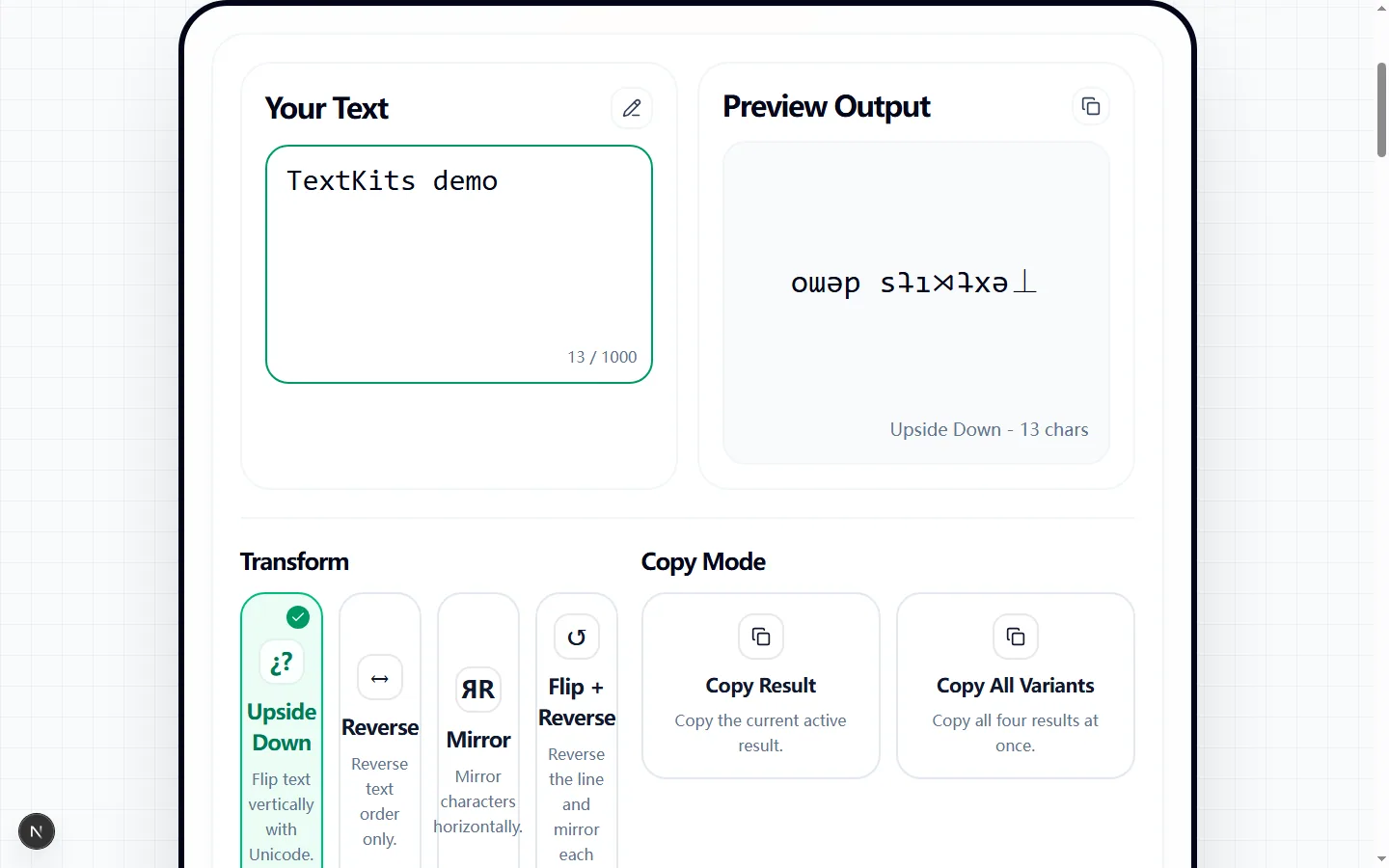
TextKits demo
What was checked
Upside-down mode with live preview
Upsidedown Text Generator showing a tested flipped version of TextKits demo
The output uses available Unicode lookalikes and reverses their order so the phrase reads more naturally after the display is rotated.Real tool capture; surrounding artwork is decorative.

Choose the transformation by reading direction

The four modes do distinct work. Upside Down reverses the character order and replaces supported characters with vertical-looking Unicode equivalents, which lets the line read naturally when physically turned around. Reverse only changes the order. Mirror substitutes horizontally reflected-looking characters without reversing the sentence, while Flip + Reverse reverses the line and applies mirrored equivalents where available.

Testing a short, familiar phrase first makes the differences obvious and reveals exactly how your specific punctuation and emoji will map before you convert a longer message. The active card controls the large preview, the one-result copy action, and the HTML Unicode panel.

A live workflow for messages up to 1,000 characters

Enter or paste text in the left panel and this upsidedown text generator calculates all four results immediately, up to the displayed 1,000-character limit. In testing, a 1,005-character paste stopped at 1,000. Switching a Transform card changes the active preview without erasing the source; Generate clears copy feedback, and Clear removes the input.

Short phrases are easier to inspect and usually survive narrow profile fields or chats better than long paragraphs. If the output is intended for a username, bio, or status, test the destination's own length limit as well. The tool's counter describes the source field only and does not guarantee that another service will accept the transformed result.

Copy plain Unicode text, all variants, or HTML entities

Copy Result places the active transformed string on the clipboard. Copy All Variants creates a labeled plain-text list containing Upside Down, Reverse, Mirror, and Flip + Reverse. Neither action creates an image, rotates a CSS element, or installs a font; the copied value is made of ordinary and substituted Unicode characters.

The HTML Unicode panel encodes every code point in the active result as a hexadecimal numeric entity. That version is useful when inspecting or inserting encoded characters into HTML-aware source, but a plain chat message should normally use Copy Result instead. Always preview encoded text in the page or system that will render it rather than assuming the entity string itself is the visible design.

Why some letters, accents, and emoji do not flip cleanly

There is no complete upside-down or mirror alphabet in Unicode. The tool uses curated look-alike mappings for supported Latin letters, numbers, and punctuation, and leaves an unsupported character's glyph unchanged. Reversing modes can still move that character to a different position. Some mapped capitals are visual approximations rather than exact rotations, so the final result also depends on the destination font.

Complex emoji, combining accents, and multi-code-point symbols deserve extra care because reversing code points can separate pieces that appear as one visible character. Non-Latin scripts may also remain mostly unchanged. Use the built-in Character Reference tabs to inspect supported uppercase, lowercase, number, and symbol mappings, then test any special characters separately before using a long result.

Verify the pasted result instead of trusting one preview

Paste the chosen output into the actual Discord message, social profile, document, or website field and compare it with the generator preview. Confirm the order, punctuation, spacing, and fallback glyphs on both desktop and mobile when both audiences matter. The destination app chooses the final font, so its rendering can differ from the browser used to generate the text.

If one transformed character becomes a box or is difficult to read, try Reverse for an order-only effect, choose another mode, or replace that character manually. Keep a plain-text version of important information nearby: upside-down and mirrored text can be harder for screen readers, search, copying, and moderation systems to interpret, so it should be decorative rather than the only form of an essential instruction.

Upsidedown text generator FAQ

These answers cover Unicode look-alike mappings, reverse versus mirror output, phone compatibility limits, and free browser use.

Why do some letters look slightly weird when flipped?

+
Unicode does not contain a perfect inverted match for every letter. The tool uses a curated look-alike when one is available and otherwise keeps the original character. The destination font can also change the shape or show a fallback box, so preview important text where you plan to paste it.

What exactly is the difference between reversing and mirroring?

+
Reverse changes the order of the source, so 'hello' becomes 'olleh'. Mirror keeps the order but replaces supported letters with horizontal look-alikes. Upside Down combines reversed order with a separate vertical-looking character map, so it is a third, distinct result.

Can my friends read this on their phones?

+
Most current phones can display many of the Unicode characters used here, but support is not guaranteed for every mapped symbol or font. Paste a short sample into the target chat or profile first; if a glyph becomes a box, try Reverse or replace that character with plain text.

Do I have to pay to use this?

+
The upsidedown text generator is free to use in the browser and does not require an account. Type or paste up to 1,000 characters, choose a mode, and copy the result; the transformation runs locally on the page.