Make Text Vewy Kawaii

Uwu Text Generator

Use this uwu text generator to rewrite up to 1,000 characters with adjustable UwuRead more

Your Text

48 / 1000

Preview

Pw-Pwease wemembew to bwing snyacks
fow movie nyight! (˘ ᵕ ˘)
61 chars

Uwu Voice

Ready to generate voice from uwu output.
54 voice charsNo audio yet

Intensity

Add-ons

Protect

Background ASCII

Merged

GIF

Classic mode keeps the balance between cute and readable.

Runs locally in your browser.

How does this cute text magic work?

The uwu text generator is a rule-based text rewriter, not a downloadable font or a literal language translator. It changes familiar letter and sound patterns—such as r and l to w and n before a vowel to ny—then applies only the faces, stutters, emojis, or Owo Mode you select.

The result is ordinary copyable text, so people looking for an uwu font can paste the style into a compatible chat, caption, or profile without installing anything. URL, mention, and hashtag protection works only when its toggle is on and the token matches a recognizable pattern; unusual punctuation or platform-specific syntax still needs a destination check.

Why do we let you customize the chaos?

Soft, Classic, and Chaotic change how often optional effects appear; Faces, Stutters, Emojis, and Owo Mode remain separate switches. This lets the uwu text generator keep a short message readable or deliberately exaggerate it without forcing every decoration at once.

In a verified Classic test, Please remember to bring snacks for movie night! first produced Pwease wemembew to bw-bwing snyacks fow movie nyight! (=^・^=). Generate kept the source unchanged and added another optional stutter at m-movie while retaining bw-bwing, confirming that the seed can change randomized effects without changing the core rewrite rules.

Uwu Voice Generator

Press Voice after the text preview is ready to create a shortened, speech-safe script. The first uncached request downloads a quantized speech model, then generation runs in a browser worker; it can take several minutes on a slower connection or device rather than finishing as quickly as a text copy.

The tested 54-character script produced a ready preview, a 23,328-byte MP3, and a 90,514-byte WAV with the Female profile at 1.00x. The speech script removes kaomoji and decorative symbols and can change stutters into pauses, so listen before sharing instead of expecting a character-for-character reading.

Tested on the live tool

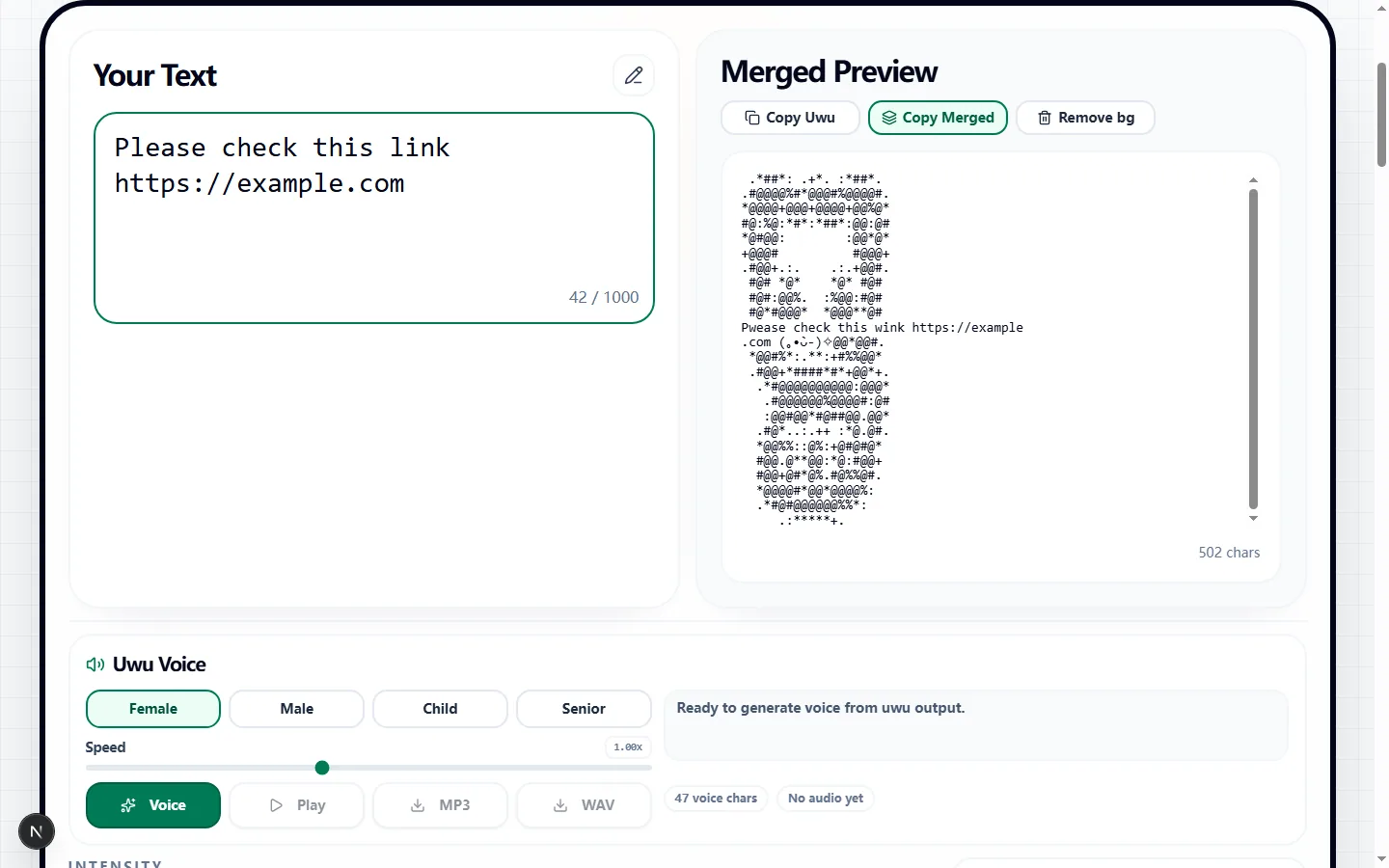
A protected-link transformation test

The sample combines normal prose with a URL, which exposes whether the cute-language transformation preserves text that must remain functional.

Test input
Please check this link https://example.com
What was checked
Classic transformation with link protection
Uwu Text Generator showing a tested transformed sentence with its example link preserved
The sentence receives the selected speech pattern while the protected URL remains usable instead of being rewritten character by character.Real tool capture; surrounding artwork is decorative.

Build a readable uwu version first

Enter up to 1,000 characters in Your Text and begin with Classic intensity. The preview updates from that source, applying the page's letter changes and selected add-ons while keeping the original available in the input panel for direct comparison.

Use Soft when the message still has to read like normal conversation, or Chaotic when a deliberately exaggerated result is the point. Generate keeps the source but creates a fresh seeded variation of optional stutters, faces, emojis, and other randomized details. Clear is a reset action: it restores the default example, background, controls, GIF settings, and voice settings rather than leaving an empty input.

Choose the transformations instead of accepting a black box

The core conversion changes familiar sounds and letters—for example, r and l become w, and some n-plus-vowel sequences gain a y. Faces, stutters, emojis, and Owo Mode are separate add-ons, so you can switch off the pieces that make a particular message too busy.

Owo Mode also uses its own word substitutions and adds an owo-style suffix, while intensity influences how often optional effects appear. Review the whole preview after changing a control because the generator transforms text tokens, not just a single visual font layer.

Protect links, mentions, and hashtags

URL, @Mention, and #Hashtag protection are enabled by default. In the verified source Really love noodles https://example.com @Luna #Ramen, all three protected tokens remained exact while the surrounding words changed. With the protections disabled, the same run changed them to https://exampwe.com, @Wuna, and #Wamen.

Protection depends on recognizable text patterns, so verify unusual URLs, punctuation attached to a tag, and platform-specific handles after conversion. If a token matters operationally, copy the result into the target composer and test it before publishing rather than assuming every service parses it identically.

Combine text with the actual Background ASCII controls

The page includes a default kawaii image and accepts PNG, JPG, GIF, or WebP uploads for Background ASCII. It samples image brightness into character rows; Width changes the number of columns and Density changes how strongly the ASCII pattern is filled.

Copy Uwu copies only the transformed sentence. Copy Merged creates a multiline uwu ASCII composition after a background image has been converted. In the browser test, Remove bg disabled that composition and Copy Merged then matched the text-only Uwu output; it did not retain placeholder ASCII.

Preview voice and GIF exports with realistic expectations

The voice panel shortens the generated text, removes characters the speech model may not handle well, and lets you choose a profile and speed before generating playback plus MP3 and WAV files. If the model is not already cached, voice generation downloads model files for local browser inference, so it needs a network connection and can take much longer than later text-only actions.

GIF controls provide mode, speed, intensity, and frame settings on a fixed 560 × 300 export canvas. Export runs only when requested; a verified eight-frame browser test completed as a 351,740-byte GIF. More frames can increase encoding time and file size, and device speed also affects completion time.

Run a practical compatibility check

For chats and captions, paste Copy Uwu into the exact destination and confirm line breaks, protected tokens, emoji support, and the final character count. Reduce intensity or disable add-ons if the sentence becomes difficult to follow, especially when it contains instructions or several proper names.

For merged ASCII, test in a monospaced field because proportional fonts can disturb the alignment, and expect narrow mobile composers to wrap wide rows. For audio or GIF output, play the finished file locally before uploading so you can check pronunciation, pacing, crop, background, and animation length.

Uwu text generator FAQ

These answers cover token protection, intensity and add-on controls, and what runs locally in the browser.

Will my links and mentions get ruined?

+
The default protection switches preserve recognizable URLs, @mentions, and #hashtags while the surrounding text changes. They are not a guarantee for every unusual token: keep the relevant switch on, then verify the pasted result in its destination before publishing.

Can I dial down the intense faces and stutters?

+
Choose Soft to reduce how often optional effects appear, then turn Faces, Stutters, Emojis, or Owo Mode off individually if you want tighter control. Classic is the default balance; Chaotic deliberately increases variation.

Does my text get sent to a server?

+
The core Uwu rewrite, uploaded-image reading, GIF encoding, and speech inference run in your browser. Optional voice generation downloads model and library files when they are not already cached, and the page still makes normal asset requests, but the source text is not posted to a text-conversion API.