Tone Twist Tool

Sarcasm Text Generator

Use this sarcasm text generator to convert your wording into alternating or random mixed case, with optional Cursed Unicode substitutions.Read more

What this sarcasm text generator actually does

This sarcasm text generator keeps the words you enter and changes their letter case. In the default Normal and Alternating settings, the tested line That worked perfectly! 123 became tHaT wOrKeD pErFeCtLy! 123; the punctuation, spaces, and digits stayed in place.

It does not write a joke, translate tone, or decide whether a sentence is sarcastic. You supply the wording. Normal uses ordinary ASCII letters, while Cursed may replace supported letters with characters from built-in Unicode pools, so it is a character converter rather than a downloadable font.

Alternating versus random casing

Alternating follows a predictable lower/upper sequence through ASCII letters. On the short test One two, the default result was oNe TwO, showing that the sequence continues across the space. Start lower changed it to oNe tWo, while Start upper produced OnE TwO by restarting the sequence after the space.

Random makes a fresh upper-or-lower choice for each ASCII letter. Selecting Random turns off and disables Start lower and Start upper because there is no word-start pattern to enforce. If you need a result that can be recreated exactly, use Normal characters with Alternating case.

Where do people actually use sarcastic text?

A sarcastic text generator is most useful for a short parody caption, an exaggerated quote, or a playful group-chat reply where mixed case already has a clear meaning. Keeping the line brief makes the capitalization pattern easier to recognize and lets you check that the original wording still says what you intended.

The Mocking SpongeBob reference describes the familiar mixed-case meme convention. This page does not add or export a SpongeBob image. TextKits is independent and is not affiliated with or endorsed by Nickelodeon, Paramount, or SpongeBob SquarePants; names and marks belong to their respective owners.

Tested on the live tool

A casing-pattern comparison

A short sentence makes the alternating capitals easy to inspect and avoids letting decorative options hide the joke's wording.

Test input
That worked perfectly
What was checked
Readable alternating-case mode
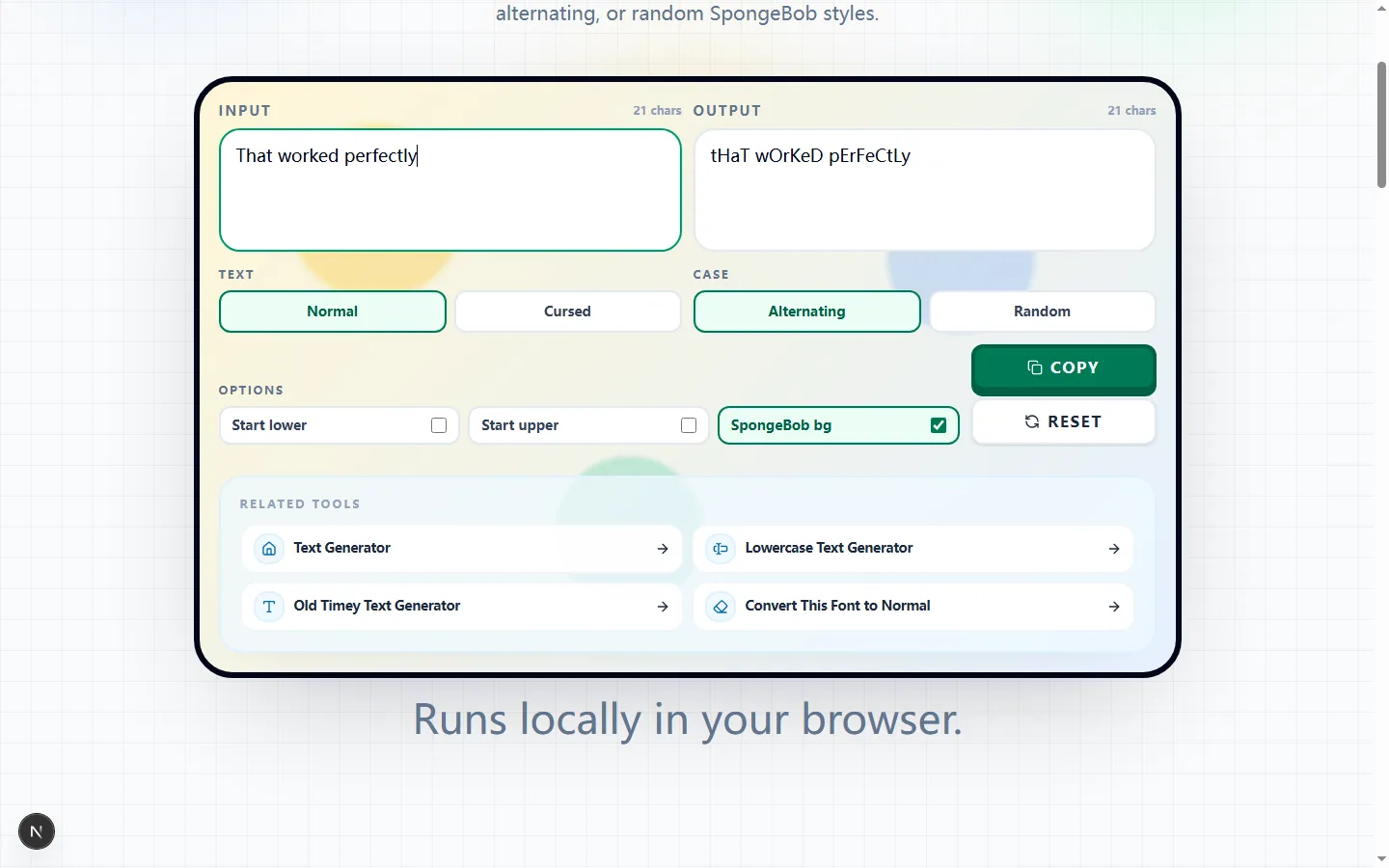
Sarcasm Text Generator showing a tested alternating-case version of That worked perfectly
The generated casing changes the tone while leaving the words recognizable enough to copy into a caption or chat reply.Real tool capture; surrounding artwork is decorative.

Turn one line into mocking case without rewriting it

Type or paste the sentence you already want to use. The sarcasm text generator preserves its order, spaces, punctuation, and digits while converting ASCII letters according to the selected case mode. The read-only Output box lets you compare the source and result before copying.

In the clipboard test, That worked perfectly generated tHaT wOrKeD pErFeCtLy, and Copy placed that exact output on the clipboard. The tool does not add a punchline, infer intent, or repair wording, so read the sentence for meaning as well as casing.

Alternating case and word-start controls

Alternating changes only ASCII A-Z letters as it moves through the line; punctuation and digits remain where they were. Without a word-start option, a space does not reset the sequence, which is why One two becomes oNe TwO rather than giving both words the same starting case.

Enable Start lower or Start upper when you want the sequence to restart after each literal space. Only one can be selected at a time: choosing Start lower clears Start upper, and choosing Start upper clears Start lower. Check contractions, hyphenated words, tabs, and line breaks separately because these controls are tied to spaces rather than linguistic word detection.

Random case and Cursed characters are separate choices

Random controls capitalization; Cursed controls which character is emitted. Random can be combined with Normal or Cursed, but it makes an independent case choice for each ASCII letter and can produce a different pattern whenever the input or an option changes.

Cursed chooses from built-in one-character Unicode pools after casing is selected. A tested run changed some letters in That worked perfectly! 123 while leaving the spaces, exclamation mark, and digits in place. Because substitutions are randomized, treat the visible output as one generated result and copy it only after all settings are final.

The SpongeBob background is only a workspace theme

SpongeBob bg changes the editor's decorative colors; it is not part of the output string and Copy writes text only. It does not place a character image behind the text or create a downloadable meme image.

One implementation detail matters when Random or Cursed is active: changing any option reruns the transformation. In testing, turning the background off produced a different Cursed result even though the background itself was visual-only. Set the workspace theme first, then review and copy the final generated text.

Good uses and places to avoid

Use mixed case for a short, clearly playful reaction, parody caption, or deliberately exaggerated quote. A sarcastic text generator changes presentation, not context, so choose wording that will not be mistaken for harassment, impersonation, or a factual correction.

Avoid mixed or Cursed characters in passwords, email addresses, URLs, code, legal wording, search terms, usernames, or any field that must match exactly. Unicode substitutions change the actual characters and may be read differently by screen readers, rejected by a platform, or become difficult for another person to search and copy.

Check the copied output in its real destination

Read the Output box once for meaning and character accuracy, then press Copy and paste into the actual comment, profile field, or chat composer. Confirm that the destination accepts every character, keeps the whole line, and renders any Cursed substitutions legibly in its font.

If the result is hard to read, return to Normal or use Alternating for a predictable pattern. Reset clears both fields and restores Normal, Alternating, both word-start controls off, and the decorative background on, giving you a known starting point for another test.

Sarcasm text generator FAQ

These answers explain what the converter changes, why randomized output can move, and which settings affect copied text.

Is this writing the sarcasm for me?

+
No. The tool preserves the wording you enter and changes its case or supported characters. You provide the joke or sarcastic context; the output box shows the transformed version for review.

What does the Cursed mode actually do?

+
Cursed chooses randomized replacements from built-in Unicode pools for supported ASCII letters after the case pattern is selected. These are actual character substitutions, not a visual font, and a result can change after an input or option update.

Why can't I click the word-start checkboxes in Random mode?

+
Random makes an independent case choice for each ASCII letter, so it has no fixed lower-first or upper-first word pattern. Selecting Random clears both word-start settings and disables their checkboxes until Alternating is selected again.

Does the SpongeBob background change my text?

+
The background is not copied and does not add an image to the output. However, toggling it is still an option change, so an active Random or Cursed transformation may regenerate; review the final output after setting the background.