Shape Poem Generator
Bring your finished lines into this free shape poem generator and arrange your poetry in a shape. Try a silhouette for a classroom handout or a writing project, then check how your shape poetry reads before copying or printing it.
Poem preview
7 source lines placed
How to Use the Concrete Poem Maker
Start with a verse you wrote or try an original example. This shape poem maker keeps your source text intact as you change the layout.
- Add your verse. Paste text, import a UTF-8
.txtfile, or load one of the four original poems. The source limit is 2,500 UTF-16 units. An optional single-line title has its own 80 UTF-16 unit limit. - Choose a shape. Switch between Fill to set words inside a silhouette and Outline to place them along its edge. Test different silhouettes in the shape poem generator while your text stays untouched.
- Choose how lines fit. Auto Wrap wraps at word boundaries and respects line and stanza breaks. Keep Whole Lines places complete source lines in order and flags the unplaced remainder when a line can't fit. Avoid Orphan Words tries to keep a lone word from ending a wrapped line when there's room.
- Check the reading order. Use Follow a line with a click, tap, hover, or the Previous and Next controls to see its placed fragments and any unplaced part. If some text doesn't fit, try a wider shape or reduce line or word spacing. Show reading flow adds numbered arrows. Play line reveal shows the lines in order, with the full poem shown immediately if reduced motion is enabled.
- Copy or export. When the poem fits, choose Copy source, Copy text art, or a graphic or print format.
Use Save, Open, and Delete for one saved draft in this browser. Export a versioned JSON recipe to keep your verse, title, shape, and line styles together, or import one to resume editing. A failed import leaves the current draft in place.
Choose Poetry Shapes for Concrete Poetry
In shape and concrete poetry, the outline can echo the subject of the verse. A short opening can fit the point of a star. A longer line may need the middle of a cloud. Try both shapes and see where your longest line fits.
Ten built-in poetry shapes come ready to use: Pine Tree, Raindrop, Cloud, Leaf, Five-Point Star, Crescent Moon, Diamond, Classic Heart, Kite, and Fish. Open Custom shape to draw a closed silhouette or import a local PNG, JPEG, or WebP mask up to 2 MiB and 2048 × 2048 pixels. Use Apply to put the custom shape on your poem.
For heart lettering, use the Heart Shape Text Generator. To wind words along a spiral, use the Spiral Text Generator. Stay with this shape poem generator for multi-line verse across silhouettes or custom masks.
Shape Poetry Ideas and Original Examples
These shape poetry examples show how the length of a line can help suggest the outline. Load a sample in the shape poem generator to see where each line lands. The four original poems are dedicated under CC0.
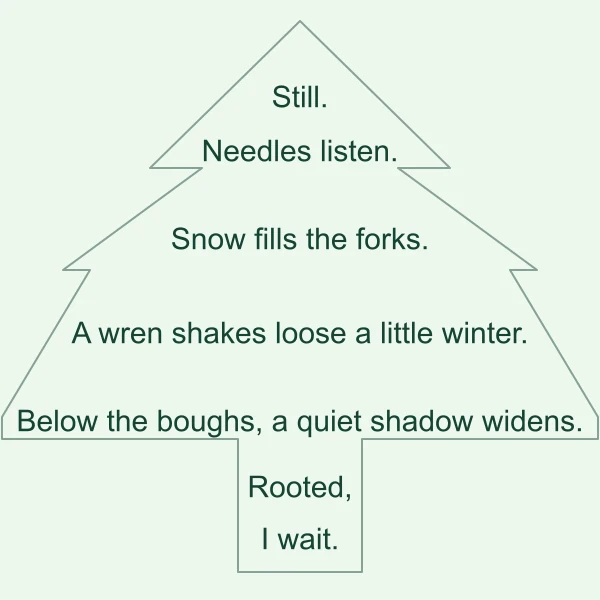
Pine Tree
Try short lines at the crown and longer lines for the lower branches.
Still. Needles listen. Snow fills the forks. A wren shakes loose a little winter. Below the boughs, a quiet shadow widens. Rooted, I wait.
Raindrop
Start with a few words, widen the reflection, then narrow the final line.
I slip from the eave, carrying one bent window. The whole gray sky comes with me until a puddle opens.
Star
Try short phrases around one longer line in the Five-Point Star.
A pinprick. The roof tilts toward it. A bus turns the corner and goes dark. One light keeps its place. I count to five.
Moon
Keep the lines short for the narrow parts of the Crescent Moon.
At the rim of the empty bowl, the moon keeps a sliver of yesterday's light. The rest is night.
Plain-Text Copy vs. Printable PNG / SVG Export
Choose a copy or export format based on where your poem will go.
- Copy source takes the verse from the textarea, including whitespace and Unicode. The separate title stays out of the copy. Your platform may represent line endings differently.
- Copy text art uses spaces to approximate the silhouette from the placed text. A monospace font and disabled word wrap help preserve the layout. Glyph widths can still vary.
- PNG uses the chosen background or white when none is set. Transparent PNG leaves the background clear. JPEG uses the chosen opaque background or white. SVG saves a static graphic that may look different if the viewer substitutes a font. Preview arrows and line reveal stay in the editor.
- Copy image for Docs / Word copies a 2× transparent PNG (1200 × 1200) when the browser allows it. If image clipboard writing is unavailable or fails, the tool downloads the PNG for you to insert.
- Print / PDF offers A4 and US Letter portrait layouts with adjustable margins, native print, and a single-page PDF download. The readability check flags small type, low contrast, and artwork near the paper edge. Ink-saver print applies white paper, dark ink, and a thin outline to print and PDF.
If part of your verse doesn't fit, the shape poem generator lists the unplaced text before saving what fits.