Discord ANSI Message Builder

Discord Color Text Generator

Easily customize your server chats.Read more

Text Editor

0 / 2000
FG (Text Color)
BG (Background Color)

Discord Preview

# general
C
TextKits Bot APPToday at 10:30 AM
+Message #general
Tip: Use ESC[0m to reset all styles.Select a word, then apply FG or BG color.
Example ANSI Codes

ANSI Block

Plain Text

Runs and saves in your browser.

What is this ANSI color magic inside Discord?

To create Discord colored text, this Discord color text generator wraps selected characters with ANSI SGR instructions inside a fenced `ansi` code block. Each Discord text color comes from one of eight foreground codes (30–37) or eight background codes (40–47); the editor also supports Bold (1) and Underline (4).

The fixed palette is the feature boundary: there is no custom hex field, CSS editor, gradient, or rainbow mode. The separate Plain Text output removes the ANSI instructions and preserves the readable message.

Why we stick to the rules

The preview is an editor check, not a guarantee of identical rendering in every Discord client. The tool labels desktop as Best support, web as Strong support, and mobile as May vary, so verify an important message in the client and channel where it will be posted.

The same boundary applies to brand identity: TextKits is an independent, unofficial tool and is not affiliated with or endorsed by Discord. Discord names and trademarks belong to their respective owner.

Tested on the live tool

An editor-to-preview consistency test

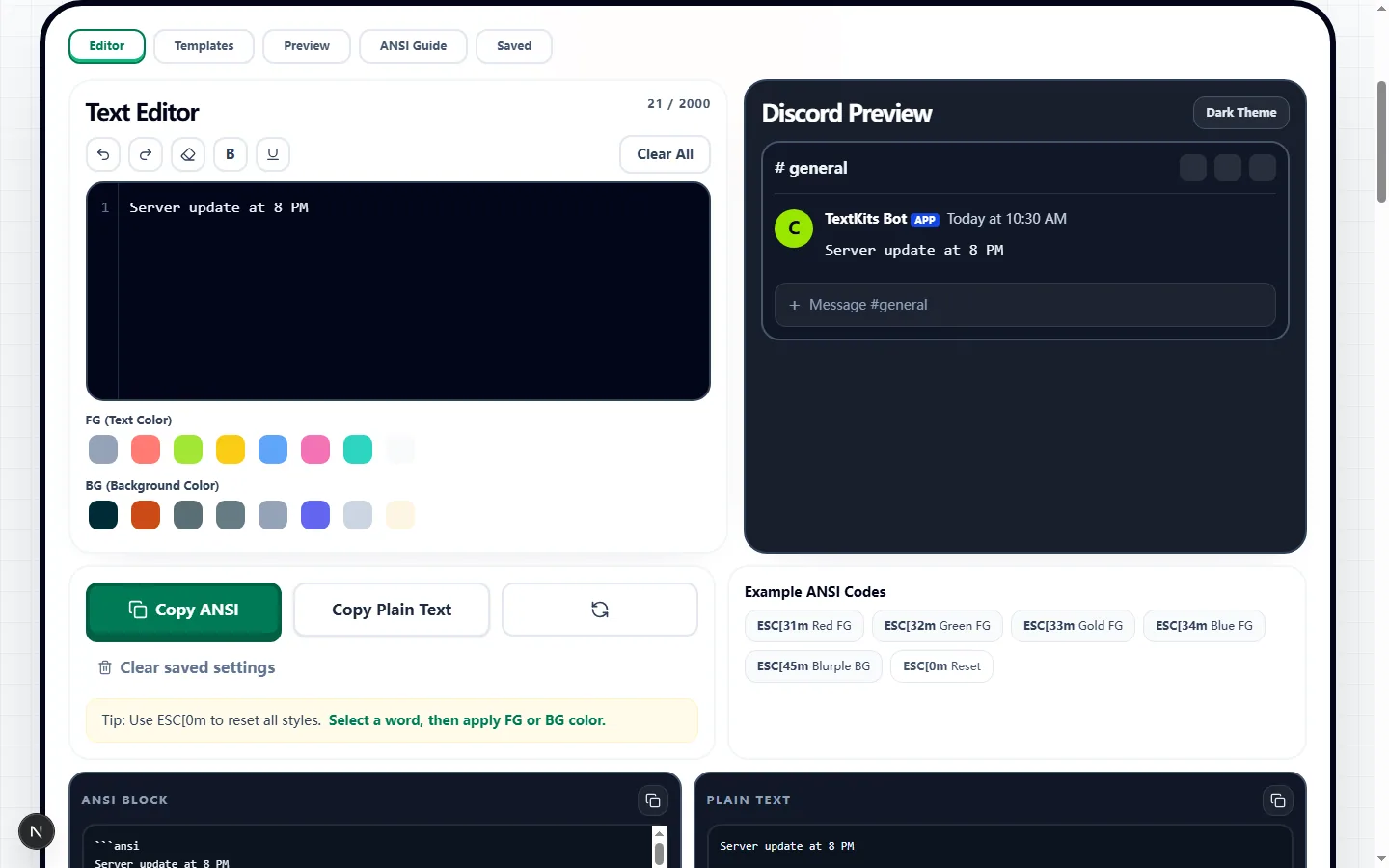
The real editor capture follows one short announcement through the editor, Discord-style preview, plain output, and fenced ANSI block.

Test input
Server update at 8 PM
What was checked
Editor, Discord preview, and ANSI block from one short announcement
Discord Color Text Generator showing one tested server announcement in the editor and Discord-style preview
The same phrase appears in the editor, Discord-style preview, plain output, and fenced ANSI block without changing its wording.Real tool capture; surrounding artwork is decorative.

Build an ANSI message from a real Discord draft

Enter the final announcement, rule, or giveaway wording, select only the phrase that needs emphasis, then apply Bold, Underline, an FG color, or a BG color. Pasting is reduced to plain text; the Announcement, Rules, and Giveaway presets provide editable starting structures without importing webpage formatting.

What the generator actually copies

Copy ANSI returns the fenced `ansi` block with escape sequences; Copy Plain Text returns only the readable characters and line breaks. These are parallel copy outputs, not switchable modes. In the tested 21-character draft, RED ALERT carried Bold and Red FG while Green light carried Green FG, and the plain output remained exactly “RED ALERT Green light.”

Foreground values use codes 30–37, backgrounds use 40–47, Bold uses 1, and Underline uses 4. A reset sequence follows styled spans so formatting does not intentionally continue through the rest of the message.

Use the preview to catch formatting mistakes

Use Dark and Light preview tabs to inspect contrast. The editor counter reports readable characters, the gutter reveals line count, and the ANSI Guide lists active codes; Clear Styles lets you keep the words and rebuild their treatment.

Read the message once without relying on color. Labels such as [RULE], [WARN], or [TIP] keep meaning available when a reader cannot distinguish the chosen colors or when a client drops the styling.

Where Discord ANSI colors work—and where they may not

These Discord code block colors rely on ANSI instructions, not CSS or hexadecimal values. For red text on Discord, select the phrase and choose Red FG (31); custom hex and brand colors cannot be encoded in this Discord ANSI block.

Desktop and web are the strongest candidates for a paste test, while mobile may vary. Another chat app, bot dashboard, or document editor may show raw codes, remove the color, or render a different result.

Keep reusable snippets on this device

The Saved tab keeps the newest three successful copy actions in this browser's local storage. Each saved value is capped at 240 characters, duplicate copies can occupy separate slots, and the list does not sync to another browser or device.

Treat Saved as a convenience for short labels, not as a full draft archive. Remove private notes before copying and clear site data after using a shared computer.

A reliable final check inside Discord

Paste the ANSI block into a private test channel or a message you can delete. Confirm the opening and closing fences remain, the first line says `ansi`, intended phrases carry the expected color, and raw escape characters are not visible.

Check the same message in every client your audience relies on. If color disappears or reduces readability, use Copy Plain Text or explicit labels so the message does not depend on decoration.

Discord color text generator FAQ

Got questions about how these chat colors work? Check out the quickest answers before you copy your ANSI text.

Is this real Discord-supported text?

+
This tool builds the fenced ANSI pattern interpreted by current Discord clients; it does not use a custom font or image. Client behavior can change, so test the copied block in Discord before an important post.

Can I use any custom hex color I want?

+
No. The editor is limited to eight ANSI foreground and eight ANSI background choices. It cannot encode a custom hex value or exact brand color.

Will my friends see the colors on their phones?

+
Possibly, but mobile rendering can vary. Keep the wording understandable without color and test the message on a phone when mobile readers matter.