Cross Out Text Online

Strikethrough Text Generator

Use this strikethrough text generator to add copyable Unicode lines or Markdown wrappers to up to 1,000 characters.Read more

How does the Unicode cross-out magic work?

The Unicode styles append one combining mark to every non-whitespace character instead of drawing an image or applying a downloadable font. In the Classic test, A B! 😀 became A̶ B̶!̶ 😀̶: the space stayed plain, while the letters, punctuation, and emoji each received the strike mark.

This strikethrough text generator offers 11 combining-mark styles plus one Markdown option. Classic is labeled Best support and Reverse Slash is Experimental, but those labels are relative—the destination font and renderer still decide where each line sits.

Unicode vs. Markdown: What's the difference?

Unicode output carries combining characters inside the copied string. Markdown keeps the source characters unchanged and wraps the whole input in two tildes on each side; the tested sample became ~~A B! 😀~~.

Markdown shows a visual strike only in an app that parses that syntax. Unicode does not need Markdown parsing, but it still needs a font and text engine that render combining marks clearly, so neither method guarantees the same appearance everywhere.

Crossed-out text vs. strikethrough text

Crossed-out text, strikeout text, and strikethrough text usually describe the same visual idea: a line through readable characters. If you searched for a crossed out text generator or a way to put a line through text, start with Classic and inspect the live preview.

The result remains text rather than an image. That makes it copyable and searchable, but the underlying letters are still present and the attached marks can affect selection, cursor movement, screen-reader output, and rendering.

When should you use crossed-out text?

Use a short crossed-out phrase for a completed task, replaced price, visible correction, or before-and-after joke. Pair it with an unmarked replacement or label when readers need to know what is current.

Do not use a line through text as the only signal for availability, discounts, deletion, or another decision-critical state. Keep long passages plain when readability or accessibility matters, and never treat the visual line as a way to hide sensitive text.

Tested on the live tool

A cross-platform strike test

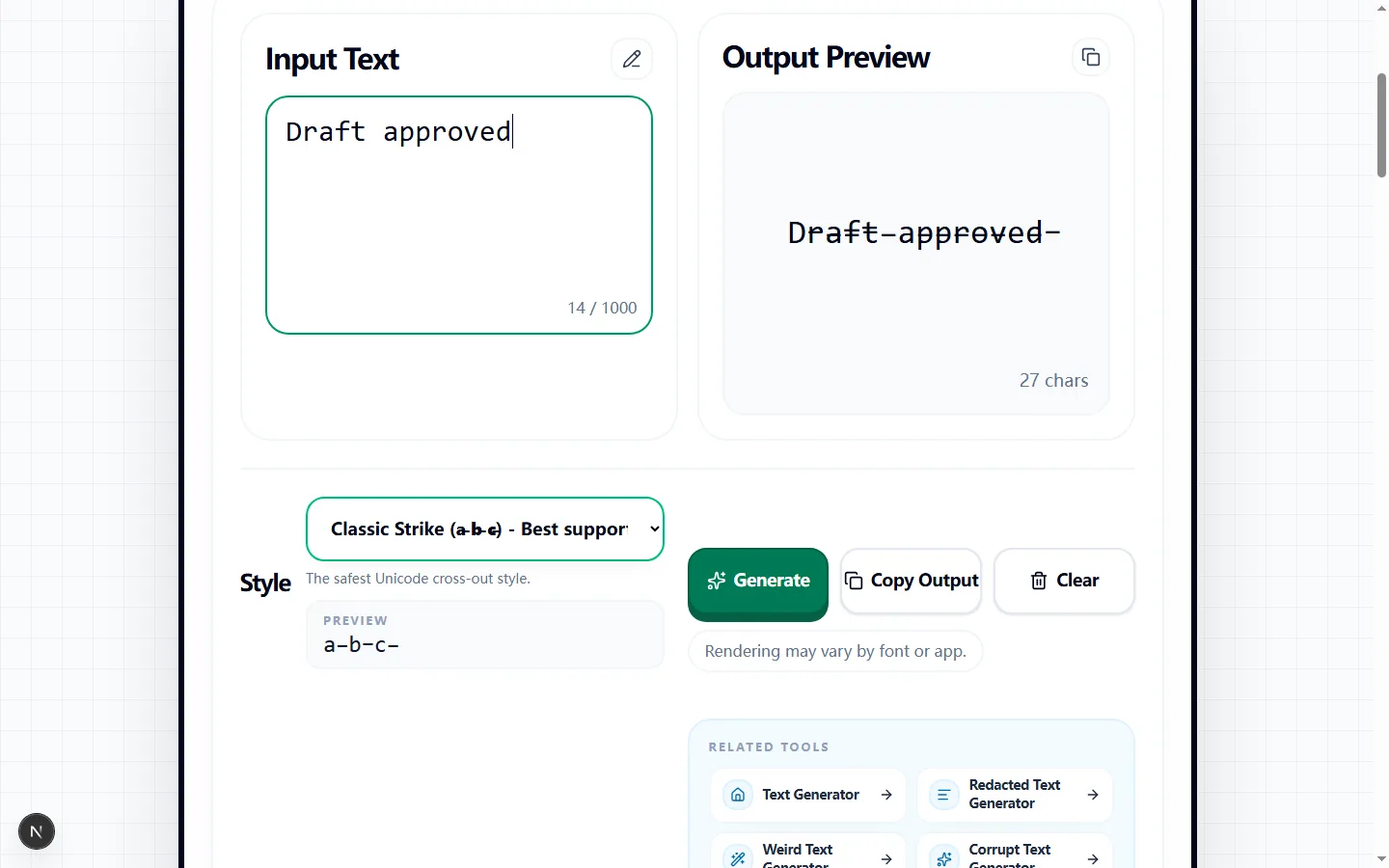
The capture starts with a simple status phrase and compares the generator's copy-ready line treatment with the untouched input.

Test input
Draft approved
What was checked
Classic strikethrough for broad compatibility
Strike Through Text Generator showing a tested crossed-out Draft approved result
The classic combining line crosses the letters without changing their order, providing a practical baseline before trying heavier styles.Real tool capture; surrounding artwork is decorative.

Create crossed-out text from the live preview

Type or paste up to 1,000 characters into Input Text. The strikethrough text generator updates Output Preview with the selected style, so you can compare the transformed line with the original before anything reaches your clipboard.

Start with Classic Strike when you simply need a line through a completed task, old price, or corrected phrase. Keep the effect to a short passage when possible; a full paragraph covered in combining marks is harder to scan and more likely to wrap unpredictably.

How each Unicode line style is produced

Classic Strike, Short Strike, Slash, Long Slash, and Reverse Slash append a different Unicode combining mark after every non-space character. The tool also includes single and double underlines, overlines, a dotted treatment, and a wavy underline built with the same character-by-character method.

These results remain text rather than an image, so Copy Output includes the original characters plus their attached marks. Spaces are left unmodified, but punctuation and letters receive the selected mark; that detail explains why dense punctuation or emoji can produce uneven-looking lines.

When to choose Markdown instead

The Markdown option does not add a Unicode mark to every character. It wraps the entire input in two tildes on each side, producing a value such as `~~draft approved~~` for apps that parse that syntax as strikethrough.

Use Markdown only when the destination explicitly supports it. In a plain text field, unsupported social profile, or app with different formatting rules, the tildes may remain visible; Unicode Classic Strike is the better test candidate when you need the crossed-out appearance to travel with the copied characters.

Compatibility varies by font, app, and character

Classic Strike is labeled Best support in the style menu, while Reverse Slash is marked Experimental. Even the better-supported combining marks can sit higher, lower, or farther across a letter when the destination uses a different font or text-rendering engine.

Some apps normalize text, remove combining characters, or display them awkwardly beside emoji and non-Latin scripts. The strikethrough text generator cannot force another platform to use the same font, and it does not convert the line into CSS formatting, so the output must be checked where readers will actually see it.

Use crossed-out text without losing meaning

Strikethrough is useful for a visibly completed checklist item, a replaced price, an edited joke, or a before-and-after phrase. Pair it with an unmarked replacement or a short label so readers can tell whether the old wording is cancelled, historical, or intentionally sarcastic.

Screen readers and search tools may still encounter the underlying letters, and a listener may not hear the visual line at all. Do not use the effect as a security measure or as the only way to communicate deletion, availability, discounts, or other information that affects a decision.

Check the copied result before publishing

Copy the output and paste it into a draft on the target platform. Compare spaces, line breaks, punctuation, accented letters, and emoji with the source, then view the draft on both a narrow mobile screen and the desktop or web client your audience commonly uses.

If marks collide, disappear, or make the sentence difficult to read, return to Classic Strike, shorten the affected phrase, or use the destination's native formatting controls. For Markdown, publish only after the draft view confirms that the surrounding tildes are parsed rather than shown literally.

Strike through text generator FAQ

These answers cover Unicode marks, Markdown parsing, compatibility, and what remains inside the copied string.

Will the crossed-out text show up correctly on Instagram, TikTok, or Discord?

+
Not reliably on every app. Classic is labeled Best support, but Instagram, TikTok, Discord, browsers, operating systems, and fonts can position or remove combining marks differently. Paste a draft into the exact destination before publishing.

Why not just use regular markdown formatting?

+
Markdown is useful when the destination parses ~~text~~. This tool's Unicode styles instead add a combining mark to each non-whitespace character. They do not require Markdown parsing, but their appearance still depends on the destination font and renderer.

Is crossed-out text the same as strikethrough text?

+
In this tool, both terms refer to readable characters with line marks attached. The output is copyable Unicode text rather than a flattened image, except that the separate Markdown choice produces tildes for a compatible parser.

Is crossed-out text a special font?

+
No. Unicode styles keep the source characters and add combining marks; Markdown adds wrapper characters. No font file is downloaded, and another app may render the result differently.

Why are some styles looking a little different from others?

+
Each menu choice uses a different combining mark or the Markdown wrapper. The tested Classic and Reverse Slash outputs placed different marks on the same letters, punctuation, and emoji; the final height, angle, and spacing vary with the destination renderer.