01
Enter plain text once
Type a username idea, caption draft, bio line, or short message into the input field. The weird text gallery instantly updates from one source text instead of forcing you into one-off outputs.
Use this weird text generator to compare seven deterministic copy-and-paste variants from one source of up to 200 characters, then adjust Intensity and Favor Readable before copying one row or all seven.
Type a username idea, caption draft, bio line, or short message into the input field. The weird text gallery instantly updates from one source text instead of forcing you into one-off outputs.
Intensity changes combining-mark density, Zalgo pass count, some spacing choices, and Symbolic substitution chances. Favor Readable keeps every row visible while reducing several glitch and symbol transformations.
Clean Weird, Glitched, Chaotic Zalgo, Mirrored, Tiny, Symbolic, and Aesthetic always appear in the same order. The same source and settings produce the same results, which makes before-and-after comparison repeatable.
Each row's copy button copies only that output. Copy All writes every non-empty output in gallery order, one per line and without labels. Clear empties the input and disables every copy button until new text is entered.
On this page, weird text is a text string made from ordinary characters, mapped Unicode code points, and combining marks. The weird text generator does not create a font file or image: each row applies spacing, overlaid marks, reversal, small forms, symbol substitution, or circled and fullwidth forms to the same source.
Coverage differs by operation and script. In the verified mixed-language source Signal 123! café 中文, Aesthetic mapped supported ASCII letters and digits while leaving é and 中文 unchanged; Mirrored kept those code points but reversed their positions, and the combining-mark rows can still decorate them. These are fallback behaviors, not language translation.
Fancy or aesthetic text usually swaps supported letters and digits for cleaner Unicode forms. Glitched and Chaotic Zalgo attach combining marks above, through, or below characters, while Mirrored reverses the sequence and maps only supported characters. Use the glitch text generator when stacked combining marks are the specific result you want.
This page is the broader comparison tool: it keeps the named operations side by side instead of presenting an unlimited font library. Clean Weird and Aesthetic are the easier starting points; Glitched, Zalgo, Symbolic, Tiny, and Mirrored serve more specialized visual effects.
Short profile lines, display names, chat jokes, captions, and draft graphics are practical uses while the source remains available for comparison. Clean Weird and Aesthetic favor quick recognition; the denser Glitched and Chaotic Zalgo rows create deliberately confusing or hard-to-read effects, so they work best on brief decorative text.
Paste the chosen row into the exact destination before publishing. Even when copying succeeds on this page, another app can strip combining marks, replace unsupported glyphs with boxes, reject unusual username characters, wrap spaced output, or read styled code points differently with assistive technology.
Tested on the live tool
Favor Readable changes several generated outputs without reordering or hiding categories, so side-by-side comparison remains stable.
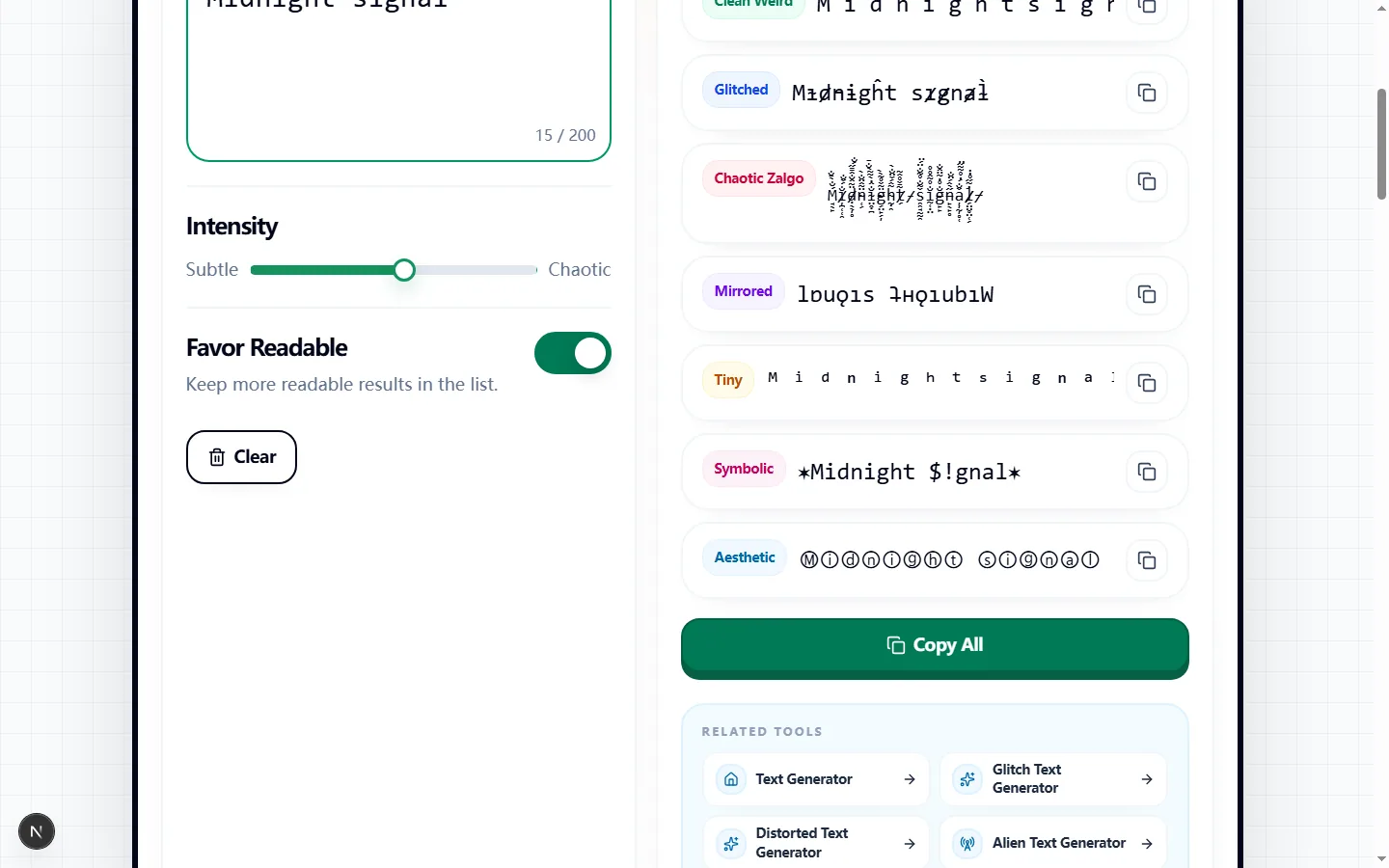
Enter up to 200 characters and the gallery builds seven labeled rows: Clean Weird, Glitched, Chaotic Zalgo, Mirrored, Tiny, Symbolic, and Aesthetic. Keeping every result beside the others makes it possible to compare actual characters rather than guessing from a style name.
The rows update from the same input, intensity, and Favor Readable setting. Copy a single row when you have chosen a style, or use Copy All to place every non-empty output on its own line so you can compare them in another editor.
Glitched and Chaotic Zalgo append combining marks, Mirrored reverses the character order and maps supported characters to mirror-like glyphs, and Tiny maps supported letters and digits to small Unicode forms. Symbolic replaces a subset of supported letters and adds decorative wrappers.
Clean Weird spaces characters, while Aesthetic uses circled forms by default and can switch to fullwidth forms at a high, less-readable setting. Unsupported characters are generally left in place, so a mixed-language input may show a combination of transformed and unchanged glyphs.
Increasing Intensity adds more accents to Glitched, raises the number of Zalgo passes, widens Tiny at higher levels, and increases the chance of Symbolic substitutions. Some structural results, including Mirrored, do not become more reversed when the slider rises.
Favor Readable changes how several rows are generated; it limits denser glitch marks and symbol replacement and keeps the cleaner spacing or circled aesthetic choices. All seven labeled categories remain visible, so use the toggle to compare gentler and riskier variants rather than expecting it to hide whole rows.
Clean Weird and moderate Aesthetic output suit short labels, profile lines, and captions where readers should recognize the source immediately. Tiny can work for compact decorative notes, while Symbolic is better for a short name or motif than for a sentence that carries detailed information.
Glitched and Chaotic Zalgo are display effects for brief horror, gaming, or meme text. Mirrored is useful as a visual puzzle, but it reverses the sequence as well as mapping characters, so it should not be used where the original reading order must stay obvious.
These outputs are text, not font files or images, but that does not guarantee identical rendering. An operating system may lack a mapped glyph, a platform may strip combining marks, and a narrow field may clip tall Zalgo stacks or wrap widely spaced output.
Search, moderation, accessibility, and screen-reader behavior can also differ from plain text because some rows replace ordinary letters with different Unicode code points. Keep the unstyled source for account names or important messages, and do not use novelty output as the only readable version of essential information.
Start with Favor Readable on and an intensity near the middle, then copy the leading candidate into the exact app and field where it will appear. Check for missing-box symbols, clipped marks, unexpected line breaks, and whether another person can still identify the intended words without seeing the source.
If the paste fails, compare the Clean Weird or Aesthetic row before lowering intensity for the more chaotic styles. Use Copy All only for private comparison—before publishing, select one tested row and keep the original plain-text version in your notes for future edits.
These answers explain character compatibility, what the outputs contain, how Favor Readable behaves, and why the current tool copies text rather than exporting images.
Keep more readable results in the list.
Runs locally in your browser.