Unofficial browser text art

Super Mario Text Generator

Use this Super Mario text generator when you want a quick fan-style title graphicRead more

without hunting for a font file, opening a heavy design suite, or signing in just to see the result. Type a short phrase, choose a safe original preset, tune the colors, then download a PNG or copy a plain-text fallback for captions and drafts.

Visual workflow

See the generated text before you export

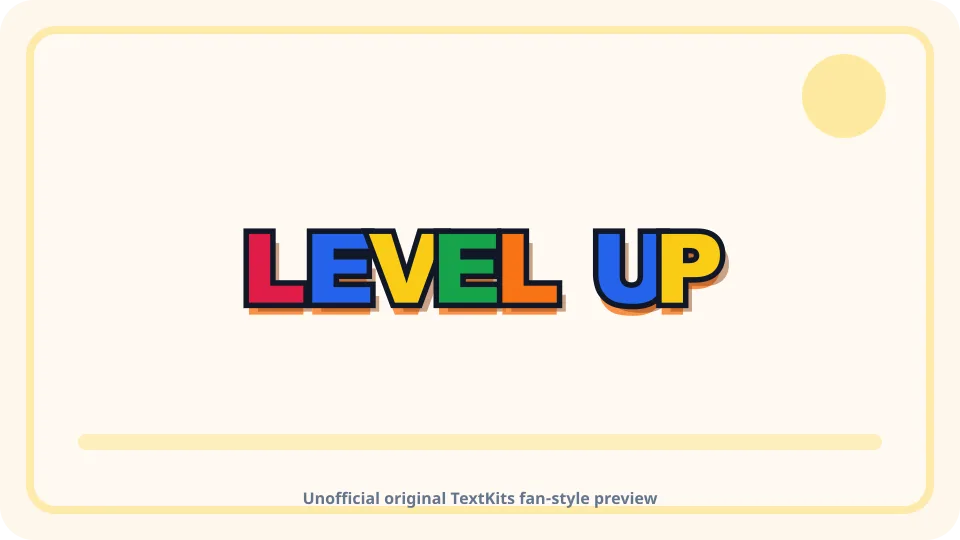
Original TextKits Super Mario-inspired multicolor text preview reading Level Up
A finished TextKits fan-style preview with multicolor block lettering, dark outline, warm depth, and a clear unofficial caveat.
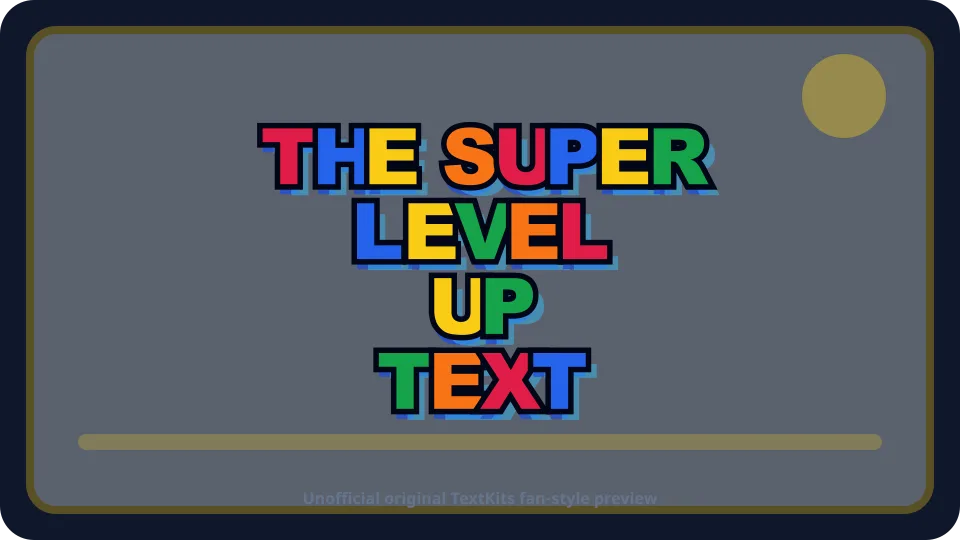
Original TextKits Super Mario-inspired stacked title preview with four text lines
A stacked title-card preview showing how separate lines can create a readable fan-style image without official logos or font files.

Fast setup

How to use the Super Mario text generator

Start with a short phrase in the main text box. Because this is a super mario text generator free of paywalls or subscriptions, the core preview, copy, and PNG workflow do not require an account. Two to five words usually work best because the preview needs room for chunky letters, outline, depth, and shadow. The preview stays inside a fixed frame, so long text scales down or shows a fit warning instead of stretching the page.

Use quick mode when you only need one centered title. Switch to stacked mode when you want a more poster-like composition with a small top line, two main title lines, and a bottom label. Each field has its own length limit so the layout stays readable on desktop and mobile.

Choose a preset before you tune details. Classic Blocks gives you a bright multicolor title. Arcade Night puts the text on a darker background. Mushroom Party uses softer playful colors. Pipe Green leans into a green accent look. The 8-bit preset keeps the shape flatter and simpler for small images. These are original TextKits presets, not official game assets.

Preview controls

Style controls and preview

The main preview is the primary output. It updates as you type and as you change lightweight settings such as size, palette, background, outline, shadow, spacing, and depth. The auto palette toggle applies a repeating letter-color sequence so you do not have to set every letter by hand.

The controls are intentionally smaller than a full graphic-design editor. You get the settings needed for a Mario-inspired title: font style, size, letter spacing, background color, transparent background, outline thickness, shadow strength, and 3D depth. You do not get copied logos, character art, official textures, or protected fonts.

A fit and readability meter helps before export. If the phrase is too long, the tool can suggest shorter line breaks or a stacked layout. If the foreground and background colors are too close, the status warns you before you download an image that looks muddy at avatar size.

Outputs

PNG, transparent PNG, and copy output

Image export is the main finish line for this page. Download PNG saves the current preview as a browser-generated image. Download Transparent PNG uses the same text and effects but removes the solid background. Because transparent images can be reused in other designs, the transparent export flow shows a short fan-use acknowledgement before it prepares the file.

The Super Mario text generator also includes text copy options. Copy Text gives you the plain phrase from the current mode. Copy CSS/HTML gives a lightweight approximate web effect for simple personal pages, notes, or prototypes. That code is an original approximation from your selected colors and shadows; it is not official branding code and should not be treated as a licensed logo system.

When you need a super mario text generator to copy and paste, remember that the fallback actions focus on plain text and lightweight CSS/HTML rather than pretending image effects can paste into every app. Copy Image may be available in some browsers. When it is not supported, the download button remains the reliable path. TextKits keeps all of this local to the browser and does not create a public hosted image or a permanent gallery URL.

Safe presets

Safe fan-style presets

A good title effect should be fast, readable, and honest about its limits. The presets in this tool are designed to feel colorful and game-like without using protected artwork. The result can work for a birthday invitation draft, game-night card, streaming thumbnail, classroom activity, or personal fan collage.

This page does not download a Super Mario font. It also does not claim that the output is exact, official, endorsed, or cleared for commercial use. If you need official Nintendo artwork, exact brand typography, merchandise rights, or a production license, you need a separate rights review outside TextKits.

For everyday fan projects, the safer approach is to use original text treatment, clear caveats, and your own background. The Super Mario text generator works best when the phrase is short and the final use is personal, playful, and clearly unofficial.

Mobile

Mobile workflow

The Super Mario text generator is designed to be usable on a phone. The text input appears early, the preview follows it, and the main copy/download actions stay near the preview before the deeper settings. Example buttons are limited on small screens so the controls do not crowd the first successful output.

Long fallback text wraps inside its own row. The preview scales inside its frame. Export buttons wrap instead of forcing sideways scrolling. If you open help or export caveats, the content stays inside the page width.

Mobile export still depends on browser support. If image clipboard access is unavailable, use Download PNG. If a transparent image opens in a new browser view, save it from the browser's file controls.

Privacy

Privacy and browser behavior

The preview and export run in your browser. Your typed text, selected preset, colors, and recent designs are not uploaded to TextKits just to generate a preview. Local recent designs store only a small set of recent settings in your browser so you can recover a style after a refresh.

You can clear the current design and remove recent local designs from the tool. Browser storage can be disabled or cleared by your device settings, so recent designs are a convenience, not a cloud backup.

For adjacent TextKits workflows, try the Sonic Text Generator, Minecraft Color Text Generator, Minecraft Sign Text Generator, Deltarune Text Generator, Fancy Thumbnail Text Generator, or All Text Tools.

Super Mario text generator FAQ

Practical answers about official-affiliation limits, Super Mario font downloads, transparent PNG export, copy and paste behavior, stacked mode, and platform rendering.

Is this Super Mario text generator official?

+
No. This is an unofficial TextKits utility. It is not affiliated with Nintendo, Mario, Super Mario, or any official game, film, merchandise, or brand project. The visual styles are original fan-style presets.

Does it provide the Super Mario font?

+
No. The tool does not provide a Super Mario font download, official font files, protected typefaces, or exact logo recreation. It creates a safe inspired text graphic from browser-rendered styles.

Can I make a transparent PNG?

+
Yes. Transparent PNG export is part of the tool scope. The export flow includes a clear personal fan-use acknowledgement and does not imply commercial-use clearance.

Can I copy and paste the result as text?

+
You can copy the plain-text fallback and a simple CSS/HTML approximation. The visual preview's outlines, shadows, depth, and transparent background are image effects, so they need PNG export to preserve the look.

What is the difference between quick mode and stacked mode?

+
Quick mode uses one text field for a centered title. Stacked mode uses separate top, main, second, and bottom lines so a longer phrase can look more like a title card without manual positioning.

Can this be used as a Super Mario Bros logo generator?

+
You can make an unofficial Mario-inspired title graphic, but the tool does not recreate the official Super Mario Bros logo. It avoids official assets, exact typography claims, and protected artwork.

Will the image look the same everywhere?

+
PNG output preserves the visual design. Plain copied text and CSS/HTML approximations can render differently across apps, browsers, fonts, and platforms, so TextKits does not promise universal rendering.